Retrieve Candidates API integration guide
Integrate the API to get candidate information from Indeed for employers.
法的注意
この API およびそのドキュメントを使用し、連携を構築することにより、お客様は追加 API 規約およびガイドラインに同意したものとみなされます。
Integration workflow
To integrate the Retrieve Candidates API:
| # | Step |
|---|---|
| 1. | Sign a Developer Agreement with Indeed. |
| 2. | Ask Indeed to register your app as part of the setup process. After Indeed has registered your app, you can use Partner Console to access your OAuth credentials: a client ID and secret. See Partner Console Credentials. |
| 3. | |
| 4. |
Develop and test your integration
-
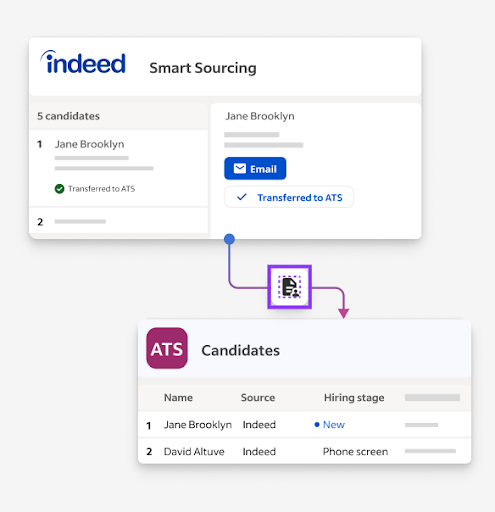
Build an ATS UI for employers to retrieve candidates and resumes, acknowledge candidates, and receive new candidates.
-
Validate that:
- You do not receive any Common GraphQL error codes when retrieving candidates.
- You can retrieve candidates.
- You can download candidates' resumes.
- You can acknowledge candidates and receive new candidates.
Retrieve ATS candidates mockup
Get approval for your integration
Demonstrate the full integration flow live or in a recorded video:
- Create a registration.
- Verify the registration is visible in the ATS UI with a disable button.
- Disable the registration to remove it.
- Create a second registration.
- Use
stageAssetsto create a mock asset for the second registration. - Verify the mock asset appears in the ATS within 5 minutes with correct source attribution (optional). At minimum, the email, name, and resume must be visible.
- Disable the registration from Indeed's UI. The candidate remains in the ATS, but any registration indicators disappear.
Indeed sends an email notification after approving your integration.