- Sponsored Jobs API prerequisites
- Configure OAuth
- OAuth v2 token scopes
- Get OAuth access token
- How-to guides for campaign management
- Create single-use campaign
- Create an objective-based campaign
- Create recurring campaign
- Edit recurring campaign
- Change campaign budget
- Change campaign timeframe
- View jobs in campaign
- How-to guides for reports
- Report on campaign performance
- How-to guides for account management
- Get employer account information
- Get subaccount information
- Create a subaccount
- Get an account budget
- Set an account budget
- How-to guides for API quota usage
- Get advertiser's API quota usage
- Recommendations and guidelines
- Prepare for eventual consistency
- Ensure compatibility with API changes
- FAQs and troubleshooting
- FAQs
- Troubleshoot common errors
- Troubleshoot OAuth errors
Sponsored Jobs API get started
Get started with the Sponsored Jobs API.
Unless you have a written agreement with Indeed regarding your use of Indeed's APIs, by using this API or its documentation, you agree to apply the Indeed API Terms and the Additional API Terms and Guidelines to your use of Indeed's APIs.
-
January 08, 2026:
Effective February 1, 2026, Indeed enforces a usage policy for the Indeed Sponsored Jobs API for all users in EU countries and Switzerland. The list of EU markets where Indeed has advertisers includes: AT, BE, CH, DE, DK, EE, ES, FI, FR, GR, IE, IT, LU, NL, PL, PT, RO, SE.
Calls to the Sponsored Jobs API are charged 3 EUR or the equivalent in the advertiser’s selected billing currency per call. Charges incur only when monthly campaign sponsorship spend is less than the total monthly API call cost.
Effective February 1, 2026, Indeed enforces a usage policy for the Indeed Sponsored Jobs API for all users in AR, AU, CA, GB, ID, IN, BR, NZ, PH, CL, SG, CO, TH, CR, MY, MX, PA.
Calls to the Sponsored Jobs API are charged 3 USD or the equivalent in the advertiser’s selected billing currency per call. Charges incur only when monthly campaign sponsorship spend is less than the total monthly API call cost.
This policy requires Indeed Sponsored Jobs API customers to pay for API usage based on their sponsorship spend. This policy does not apply to those who use Indeed's proprietary ATS plugin.
For recommended API usage patterns, see Sponsored Jobs API best practices to reduce call volume.
Use of the Sponsored jobs API is limited to paying customers that sponsor their jobs through a campaign within the last three calendar months.
Sponsored Jobs API usage is subject to a maximum number of API calls allowable in a given calendar month. The maximum number of Sponsored Jobs API calls for any month corresponds to the greater of the previous month’s Sponsored Jobs campaign spend OR credit limit.
Call the
/apiquotausageendpoint to retrieve data on your current month’s API usage.
-
January 08, 2026:
Effective December 1, 2024, Indeed enforces a usage policy for the Indeed Sponsored Jobs API in the United States.
This policy requires Indeed Sponsored Jobs API customers to pay for API usage based on their sponsorship spend.
This policy does not apply to those who use Indeed's proprietary ATS plugin.
For recommended API usage patterns, see Sponsored Jobs API best practices to reduce call volume.
-
June 17, 2024:
Effective June 30, 2024, Indeed decommissioned the
GET /v1/stats/datastatusendpoint.Requests to this endpoint return the HTTP
404status code. UseGET /v1/statsinstead.
-
June 15, 2024:
Effective June 26, 2024, Indeed decommissioned the
GET /v1/campaigns/:campaignId/stats/:dateandGET /v1/campaigns/:campaignId/stats/entryDatesendpoints.Requests to these endpoints return the HTTP
404status code.Use
GET /v1/campaigns/{campaignId}/statsinstead.
-
June 3, 2024:
Effective June 26, 2024, Indeed limited the
perPageparameter value to500for theGET /v1/campaignsendpoint.The API rejects requests to this endpoint with a
perPageparameter value that is greater than500as not valid.
- Sunset of Sponsored Jobs legacy API:
Effective January 1, 2022, the Sponsored Jobs legacy API was sunset.
Effective March 31, 2022, the Sponsored Jobs XML integration was sunset.
Effective August 1, 2021, you can migrate your integration to the latest Sponsored Jobs API gateway, which uses the Indeed OAuth v2 endpoint, and runs on a different back-end infrastructure that provides better availability and reduced latency for your app.
Review prerequisites, how-to guides with examples, and FAQs and troubleshooting.
For the Sponsored Jobs API ATS, see also Sponsored Jobs API ATS: Introduction.
Sponsored Jobs API prerequisites
Configure OAuth
Before using the Sponsored Jobs API, you need:
- An Indeed account
- Your API client ID and secret
- Jobs available to sponsor within your Indeed account
- The employers associated with your account
| OAuth | Description |
|---|---|
| 2-legged OAuth | The examples in this guide use the client credentials flow (2-legged OAuth). Use this OAuth flow if you are a direct employer, agency, or programmatic. For agencies and programmatics acting on behalf of an employer, Indeed recommends that the employer adds your Indeed account as a secondary user to their Indeed account. This enables you to use the client credentials flow (2-legged OAuth). Register your 2-legged OAuth app to get your client ID and secret: * Japan only: Use the Manage app credentials page. * Outside Japan: Use the Partner Console. If you cannot access the console, contact your Indeed representative or marketplacesupport@indeed.com. |
| 3-legged OAuth | ATS partners must use the Authorization code flow (3-legged OAuth). When you become an Indeed partner, Indeed sets up an app for your integration. Log in to Partner Console to view your app and OAuth credentials (client ID, secret, and authorization code for 3-legged OAuth). Exchange credentials for an access token to authenticate API calls. |
OAuth v2 token scopes
A scope value is required when generating the auth token for each API call.
-
Requesting a write scope also grants the permissions of the corresponding read-only scope.
For example,
employer.advertising.campaignalso grants the permissions thatemployer.advertising.campaign.readgrants. -
You can associate multiple scopes with one access token. Space-delimit the scopes.
For example
employer_access employer.advertising.campaign employer.advertising.campaign_report.read.
In your OAuth authorization code request, pass the scopes that correspond to the API endpoints you are calling.
Then, the end user chooses whether to grant you none, some, or all scopes that you requested.
Use this table to determine which scope to request for each API endpoint.
API quota usage
For this endpoint, get an access token with the employer_access scope. See Get access token that represents employer.
| Verb | API endpoint | OAuth scope |
|---|---|---|
GET | /v1/apiquotausage | employer.advertising.account.read |
Account management
| Verb | API endpoint | OAuth scope | Access token type |
|---|---|---|---|
GET | /v1/account | For employer account: | With |
For master account: | Without | ||
GET | /v1/subaccounts | employer.advertising.subaccount.read | Without employer parameter |
POST | /v1/subaccounts | employer.advertising.subaccount | Without employer parameter |
GET | /v1/account/budget | employer.advertising.account.read | With employer_access scope. See Get access token that represents employer. |
PATCH | /v1/account/budget | employer.advertising.account | With employer_access scope. See Get access token that represents employer. |
Campaign management
For these endpoints, the access token type with the employer_access scope. See Get access token that represents employer.
| Verb | API endpoint | OAuth scope |
|---|---|---|
GET | /v1/campaigns | employer.advertising.campaign.read |
POST | /v1/campaigns | employer.advertising.campaign |
GET | /v1/campaigns/{campaignId} | employer.advertising.campaign.read |
PATCH | /v1/campaigns/{campaignId} | employer.advertising.campaign |
GET | /v1/campaigns/{campaignId}/budget | employer.advertising.campaign.read |
PATCH | /v1/campaigns/{campaignId}/budget | employer.advertising.campaign |
GET | /v1/campaigns/{campaignId}/jobCount | employer.advertising.campaign.read |
GET | /v1/campaigns/{campaignId}/properties | employer.advertising.campaign.read |
Reports
For these endpoints, the access token type with employer_access scope. See Get access token that represents employer.
| Verb | API endpoint | OAuth scope |
|---|---|---|
GET | /v1/campaigns/{campaignId}/stats | employer.advertising.campaign_report.read |
GET | /v1/campaigns/{campaignId}/stats/{date} | employer.advertising.campaign_report.read |
GET | /v1/campaigns/{campaignId}/stats/entryDates | employer.advertising.campaign_report.read |
GET | /v1/stats | employer.advertising.campaign_report.read |
GET | /v1/stats/{reportId} | employer.advertising.campaign_report.read |
Get OAuth access token
To call the oauth/v2/tokens API endpoint to get an access token, update the required token to the token you need to call the API.
Most Sponsored Jobs API endpoints require an access token that represents an employer. You must therefore request employer_access scope in addition to the scopes required by the endpoints you plan to call, and include the employer parameter to specify the employer whose data you'll be accessing. However, if you have a master account and are calling subaccount management endpoint, omit the employer parameter when requesting the access token. You call the subaccount management endpoint through either:
GET /v1/subaccountsPOST /v1/subaccountsAPI details for tokens endpoint
| API URL |
|
|---|---|
| Request type | POST |
| Content type | application/json |
| Auth | None |
Request parameters for tokens endpoint
| Key | Value |
|---|---|
client_id | Client ID. Get it from: * Japan only: Manage app credentials. For more information, see Credentials. * Outside Japan: Partner Console. If you cannot access the console, contact your Indeed representative or marketplacesupport@indeed.com. |
client_secret | Client secret. Get it from: * Japan only: Manage app credentials. For more information, see Credentials. * Outside Japan: Partner Console. If you cannot access the console, contact your Indeed representative or marketplacesupport@indeed.com. |
grant_type |
|
scope | Depends on the endpoints. For example, employer_access employer.advertising.account.read. |
employer | Your employer account ID. |
Sample response for tokens endpoint
{ "access_token": "<access_token>", "scope": "employer.advertising.account.read employer_access", "token_type": "Bearer", "expires_in": 3600}How-to guides for campaign management
Create single-use campaign
This example creates a single-use campaign that runs for two weeks and sponsors jobs in two locations with a $500 budget.
-
Use access token with scopes for single-use campaign.
Create single-use campaign scope employer_access employer.advertising.campaign -
Get job source ID for jobs.
To get the job source ID, get employer account information. An employer can have more than one job source ID, one for each website or domain. The value of the
jobSourceList.idresponse field is the job source ID for each site. -
Create single-use campaign.
API details for single-use campaign:
API details for single-use campaign API URL https://apis.indeed.com/ads/v1/campaigns(Sponsored Jobs API reference)Request type POSTContent type application/jsonAuth OAuth 2.0 bearer token Sample request for single-use campaign:
{"name": "Test Campaign Single-use","status": "PAUSED","trackingToken": "MyTrackingToken","jobsSourceId": "[Your jobsSourceId from Step 2]","jobsToInclude": "QUERY","jobsQuery": "city:Aberdeen OR city:Glasgow","budgetOnetimeLimit": 500,"startDate": "2021-09-01","fixedEndDate": "2021-09-15"}Sample response for single-use campaign:
{"meta": {"status": 201,"errors": null,"rootLocation": "https://apis.indeed.com/ads","perPage": null,"links": [{"rel": "Campaign Info","href": "/v1/campaigns/c8bxxxxxxxxx449"}]},"data": {"campaignId": "c8bxxxxxxxxx449"}} -
View single-use campaign on Indeed.
API call for single-use campaign:

API call to create a campaign Single-use campaign created on Indeed:
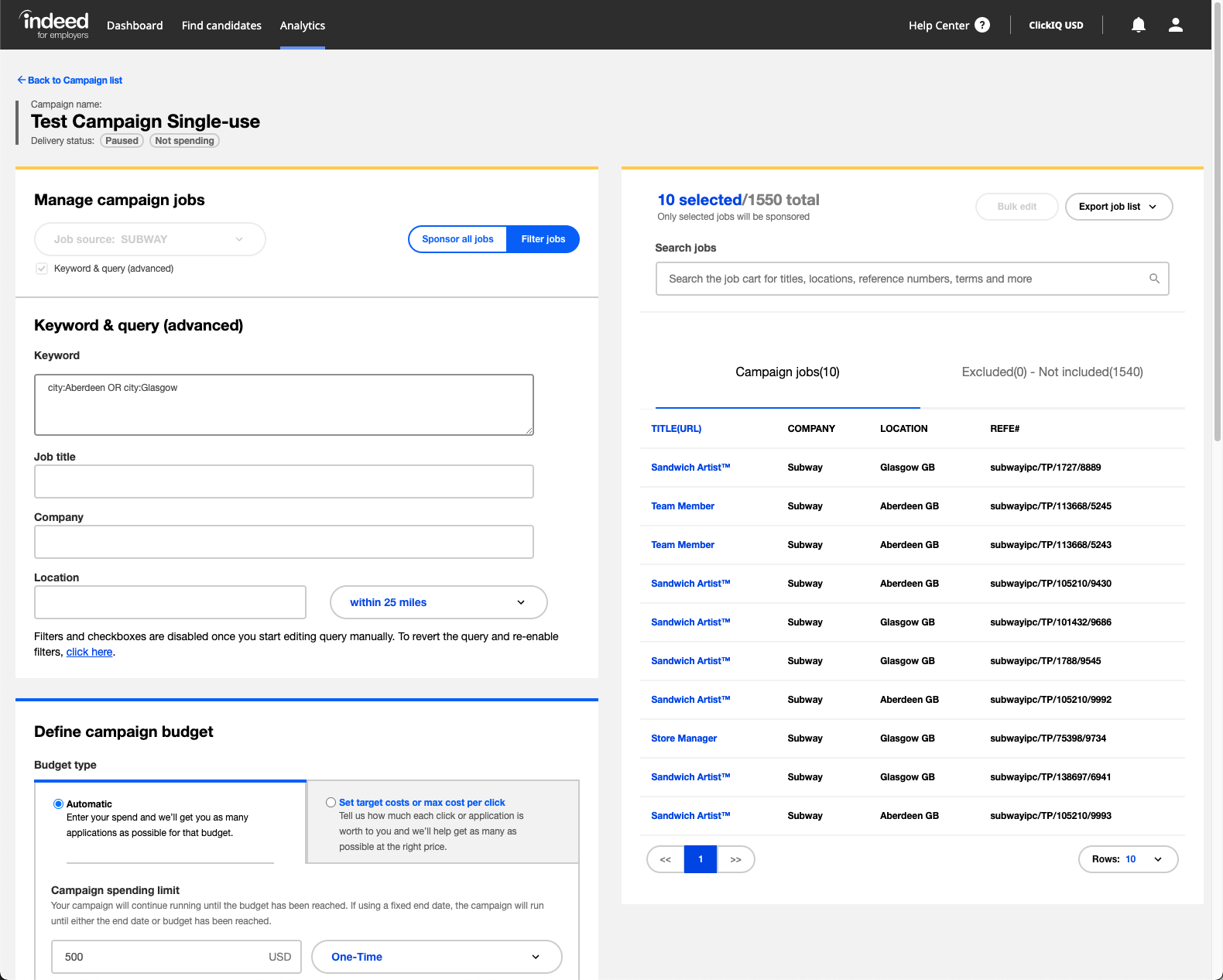
Single-use campaign created on Indeed
Create an objective-based campaign
This example creates an objective-based campaign that targets a specific amount of scheduled interviews.
-
Use access token with scopes in objective-based campaign.
Create an objective-based campaign scope employer_access employer.advertising.campaign
-
Get source ID for jobs for objective-based campaign.
To get the job source ID, get employer account information. An employer can have more than one job source ID, one for each website or domain. The value of the
jobSourceList.idresponse field is the job source ID for each site. -
Create interview objective campaign.
API details for interview objective campaign:
Create interview objective campaign API URL https://apis.indeed.com/ads/v1/campaigns(Sponsored Jobs API reference)Request type POSTContent type application/jsonAuth OAuth 2.0 bearer token Sample request for interview objective campaign:
{"name": "XXX SCHEDULED_INTERVIEWS","status": "PAUSED","trackingToken": "indeed_chi","jobsSourceId": "[Your jobsSourceId from Step 2]","jobsToInclude": "ALL","jobsQuery": "Java","jobsTitle": "software engineer","jobsCompany": "Indeed","jobsLocation": "Austin","jobsLocationRadius": 5,"fixedEndDate": "2023-10-20","budgetOnetimeLimit": 1000,"objective": {"objectiveType": "SCHEDULED_INTERVIEWS","target": 77}}Sample response for interview objective campaign:
{"meta": {"status": 201,"errors": null,"rootLocation": "https://apis.indeed.com/ads","perPage": null,"links": [{"rel": "Campaign Info","href": "/v1/campaigns/f261xxxxxxxx6567"}]},"data": {"campaignId": "f261xxxxxxxx6567"}} -
View interview campaign on Indeed.

Interview campaign created on Indeed 
Interview target setting of interview campaign created on Indeed
Create recurring campaign
This example creates a recurring campaign that runs for six months, sponsor manager jobs in three locations with a budget of $1500 per month.
-
Use access token with scopes.
Create recurring campaign scope employer_access employer.advertising.campaign
-
Get source ID for jobs for recurring campaign.
To get the job source ID, get employer account information. An employer can have more than one job source ID, one for each website or domain. The value of the
jobSourceList.idresponse field is the job source ID for each site. -
Create recurring campaign.
API details for recurring campaign:
Create recurring campaign API URL https://apis.indeed.com/ads/v1/campaigns(Sponsored Jobs API reference)Request type POSTContent type application/jsonAuth OAuth 2.0 bearer token Sample request for recurring campaign:
{"name": "Test Campaign Recurring","status": "PAUSED","trackingToken": "MyTrackingToken","jobsSourceId": "[Your jobsSourceId from Step 2]","jobsToInclude": "QUERY","jobsQuery": "(city:Aberdeen OR city:Glasgow OR city:London) AND title: Manager","budgetMonthlyLimit": 1500,"startDate": "2021-09-01","fixedEndDate": "2022-04-01"}Sample response for recurring campaign:
{"meta": {"status": 201,"errors": null,"rootLocation": "https://apis.indeed.com/ads","perPage": null,"links": [{"rel": "Campaign Info","href": "/v1/campaigns/52fxxxxxxxxx310"}]},"data": {"campaignId": "52fxxxxxxxxx310"}} -
View recurring campaign on Indeed.
API call for recurring campaign:

API call for a recurring campaign created on Indeed Recurring campaign created on Indeed:

Recurring campaign created on Indeed
Edit recurring campaign
This example locates and updates a campaign, and adds an additional location. You can also use this endpoint to start or pause campaigns, rename campaigns, and change the tracking token for your campaign. For more information, see the Sponsored Jobs API reference).
-
Use access token with scopes for updates.
Edit recurring campaign scope employer_access employer.advertising.campaign
-
List your campaigns and their IDs to get the campaign ID for recurring campaign.
API details for recurring campaign updates:
Update recurring campaign API URL https://apis.indeed.com/ads/v1/campaigns(Sponsored Jobs API reference)Request type GETContent type application/jsonAuth OAuth 2.0 bearer token Request parameters for recurring campaign updates:
Update recurring campaign request parameters Key Value perPage10 statusPAUSED typeSOURCE Sample response for recurring campaign updates:
"meta": {"status": 200,"errors": null,"rootLocation": "https://apis.indeed.com/ads","perPage": 10,"links": [{"rel": "'Test Campaign Single-use' Info","href": "/v1/campaigns/c8bxxxxxxxxx449"},{"rel": "'Test Campaign Recurring' Info","href": "/v1/campaigns/52fxxxxxxxxx310"}]},"data": {"Campaigns": [{"Name": "Test Campaign Single-use","Id": "c8bxxxxxxxxx449","Status": "PAUSED"},{"Name": "Test Campaign Recurring","Id": "52fxxxxxxxxx310","Status": "PAUSED"}]} -
Update campaign query.
In the
jobsQueryfield, pass a query using the indexed jobs query format.API details for campaign query update:
Update campaign query API URL https://apis.indeed.com/ads/v1/campaigns/<YourCampaignIdFromStep2}(Sponsored Jobs API reference)Request type PATCHContent type application/jsonAuth OAuth 2.0 bearer token Sample request for campaign query update:
{"jobsToInclude": "QUERY","jobsQuery": "(city:Aberdeen OR city:Glasgow OR city:London OR city:Birmingham) AND title: Manager"}Sample response for campaign query update:
{"meta": {"status": 200,"errors": null,"rootLocation": "https://apis.indeed.com/ads","perPage": null,"links": [{"rel": "up","href": "/v1/campaigns"},{"rel": "Campaign Info","href": "/v1/campaigns/52fxxxxxxxxx310"},{"rel": "Traffic Statistics","href": "/v1/campaigns/52fxxxxxxxxx310/stats"}]},"data": {"campaignId": "52fxxxxxxxxx310"}} -
View update campaign query on Indeed.
API call for recurring campaign update:
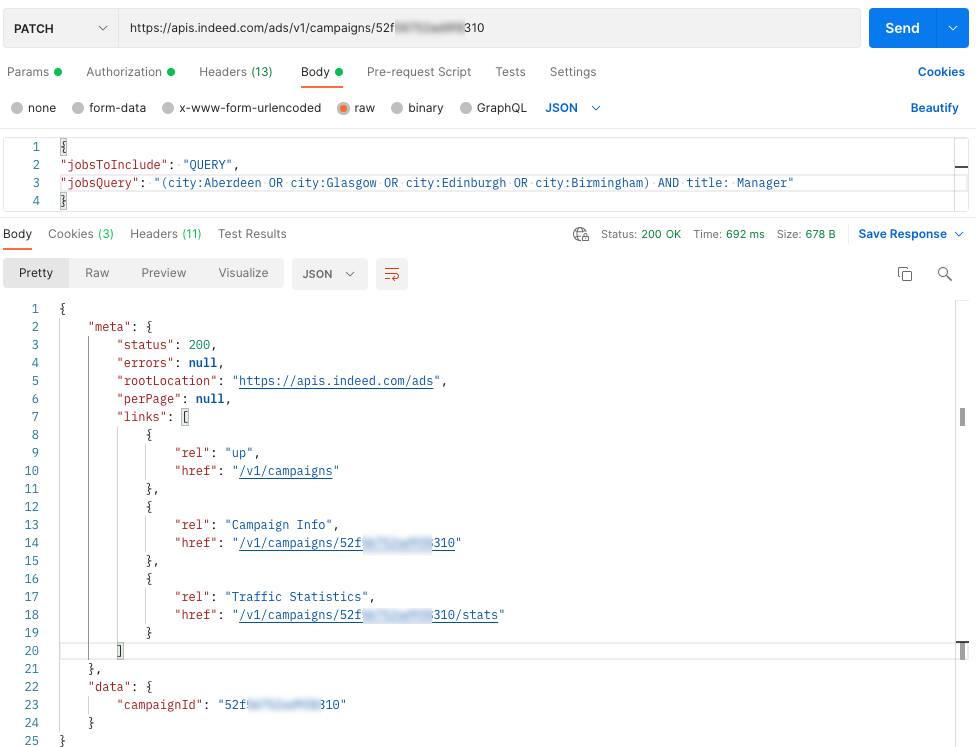
API call to edit a recurring campaign Updated recurring campaign on Indeed:

Recurring campaign updated on Indeed
Change campaign budget
This example locates and updates a campaign and increases the budget by $250 per month, from $1500 to $1750.
-
Use access token with scopes for campaign budget update.
Change campaign budget scope employer_access employer.advertising.campaign
-
Get ID of campaign budget to update.
To list campaigns, see get campaign ID for recurring campaign.
-
Update campaign budget.
API details for campaign budget update:
Update campaign budget API URL https://apis.indeed.com/ads/v1/campaigns/{YourCampaignIdFromStep2}/budget(Sponsored Jobs API reference)Request type PATCHContent type application/jsonAuth OAuth 2.0 bearer token Sample request for campaign budget update:
{"budgetMonthlyLimit": "1750"}Sample response for campaign budget update:
{"meta": {"status": 200,"errors": null,"rootLocation": "https://apis.indeed.com/ads","perPage": null,"links": [{"rel": "up","href": "/v1/campaigns"},{"rel": "Campaign Info","href": "/v1/campaigns/52fxxxxxxxxx310"},{"rel": "Traffic Statistics","href": "/v1/campaigns/52fxxxxxxxxx310/stats"}]},"data": {"campaignId": "52fxxxxxxxxx310"}} -
View campaign budget on Indeed.
API call to update campaign budget:

API call to update a campaign budget Example updated campaign budget:

Updated campaign budget on Indeed
Change campaign timeframe
This example locates and extends the time frame of a one-time campaign by two weeks.
-
Use access token with scopes for campaign timeframe.
Change campaign timeframe scope employer_access employer.advertising.campaign
-
Get ID of campaign timeframe.
To list campaigns, see get campaign ID for recurring campaign.
-
Update campaign dates.
API details for campaign timeframe:
Update campaign dates API URL https://apis.indeed.com/ads/v1/campaigns/{YourCampaignIdFromStep2}/budget(Sponsored Jobs API reference)Request type PATCHContent type application/jsonAuth OAuth 2.0 bearer token Sample request for campaign timeframe:
{"fixedEndDate": "2021-09-30"}Sample response for campaign timeframe:
{"meta": {"status": 200,"errors": null,"rootLocation": "https://apis.indeed.com/ads","perPage": null,"links": [{"rel": "up","href": "/v1/campaigns"},{"rel": "Campaign Info","href": "/v1/campaigns/c8bxxxxxxxxx449"},{"rel": "Traffic Statistics","href": "/v1/campaigns/c8bxxxxxxxxx449/stats"}]},"data": {"campaignId": "c8bxxxxxxxxx449"}} -
View campaign timeframe on Indeed.
API call to update campaign timeframe:
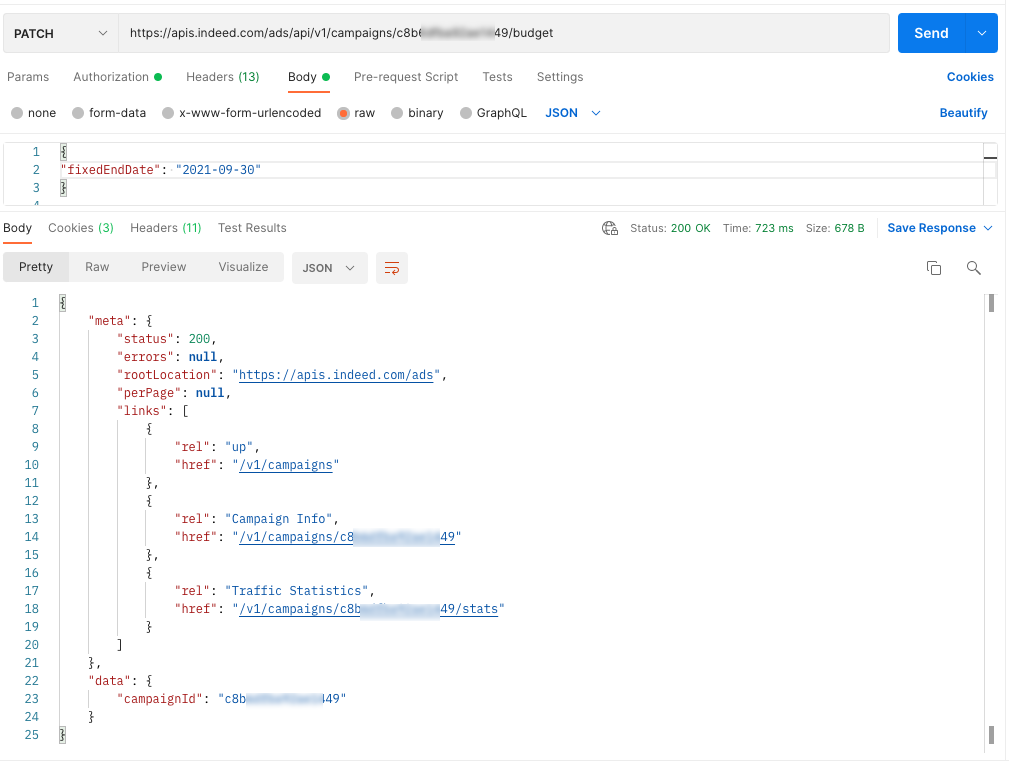
API call to update a campaign timeframe Example updated campaign end date:

Updated end date on Indeed
View jobs in campaign
This example gets detailed information for jobs sponsored by a campaign.
-
Use access token with scopes for campaign jobs.
View jobs in campaign scope employer_access employer.advertising.campaign
-
Get ID of campaign to update. To list campaigns, see get campaign ID for recurring campaign.
-
Get first page of jobs sponsored by campaign.
API details for jobs:
Get first page of jobs sponsored by campaign API URL https://apis.indeed.com/ads/v1/campaigns/{YourCampaignIdFromStep2}/jobDetails(Sponsored Jobs API reference)Request type GETContent type application/jsonAuth OAuth 2.0 bearer token Sample request for update campaign:
Request parameters for update campaign:
Update campaign request parameters Key Value start0 perPage3 Sample response for update campaign:
{"meta": {"status": 200,"errors": null,"rootLocation": "https://apis.qa.indeed.tech/ads","perPage": 3,"links": null},"data": {"entries": [{"jobKey": "839d4e5b2b8ca2a6","refNum": "267","title": "Experienced Driver","location": "London"},{"jobKey": "4191b62313a544aa","refNum": "259","title": "Branch Foreman","location": "London"},{"jobKey": "2977cb389f748f51","refNum": "305","title": "Trainee Manager","location": "London"}],"hash": 964409796}} -
Get remaining pages.
Subsequent requests follow the same format as the first. To fetch a new page, set
startas the sum ofstartandperPageof the previous request, and setperPagethe same as the previous request. For example, if the latest page was fetched withstart = 10andperPage = 5, the next page can be requested withstart = 15andperPage = 5. To get all jobs sponsored by a campaign, continue fetching consecutive pages until either:-
The
perPagemeta-field in the response object differs from the requestedperPage. This indicates that the final page has been read.perPagehas a maximum of 500, so if the requestedperPageis greater than 500, a difference in the response does not necessarily indicate that the last page was reached. -
The
hashfield in the response object differs from the value on the previous page. This indicates that the jobs list has changed while it was being read. Clients should pause for one minute, then restart reading fromstart = 0.
-
How-to guides for reports
Report on campaign performance
This example requests the performance data for a campaign over a three-day period.
The example provides both an aggregated and per-day breakdown of the result set.
Use access token with scopes for campaign performance report
| scope | |
|---|
Get the campaign ID for campaign performance report
To list campaigns, see get campaign ID for recurring campaign.
Get campaign statistics
API details for campaign performance report
| API URL |
|
|---|---|
| Request type | GET |
| Content type | application/json |
| Auth | OAuth 2.0 bearer token |
Request parameters for campaign performance report
| Key | Value |
|---|---|
startDate | 2021-07-16 |
endDate | 2021-07-31 |
merge |
Set to |
API response (Merge = TRUE)
{ "meta": { "status": 200, "errors": null, "rootLocation": "https://apis.indeed.com/ads", "perPage": null, "links": [{ "rel": "up", "href": "/v1/campaigns//b0fxxxxxxxxx327/stats" }] }, "data": { "Name": "TMN test UK - Target Applies", "Id": "/b0fxxxxxxxxx327", "StartDate": "2021-07-22", "EndDate": "2021-07-24", "Clicks": 989, "Impressions": 8384, "Conversions": 217, "CurrencyCode": "USD", "Cost": 598.69, "OrganicClicks": 35, "OrganicImpressions": 303, "Applystarts": 320, "OrganicApplystarts": 18 }}API response (Merge = FALSE)
{ "meta": { "status": 200, "errors": null, "rootLocation": "https://apis.indeed.com/ads", "perPage": 10, "links": [ { "rel": "up", "href": "/v1/campaigns//b0fxxxxxxxxx327/stats" } ] }, "data": { "entries": [ { "Name": "TMN test UK - Target Applies", "Id": "/b0fxxxxxxxxx327", "Date": "2021-07-22", "Clicks": 373, "Impressions": 3238, "Conversions": 83, "CurrencyCode": "USD", "Cost": 258.76, "OrganicClicks": 22, "OrganicImpressions": 226, "Applystarts": 125, "OrganicApplystarts": 9 }, { "Name": "TMN test UK - Target Applies", "Id": "/b0fxxxxxxxxx327", "Date": "2021-07-23", "Clicks": 318, "Impressions": 2665, "Conversions": 74, "CurrencyCode": "USD", "Cost": 178.28, "OrganicClicks": 7, "OrganicImpressions": 42, "Applystarts": 104, "OrganicApplystarts": 4 }, { "Name": "TMN test UK - Target Applies", "Id": "/b0fxxxxxxxxx327", "Date": "2021-07-24", "Clicks": 298, "Impressions": 2481, "Conversions": 60, "CurrencyCode": "USD", "Cost": 161.65, "OrganicClicks": 6, "OrganicImpressions": 35, "Applystarts": 91, "OrganicApplystarts": 5 } ] }}API call for campaign performance report
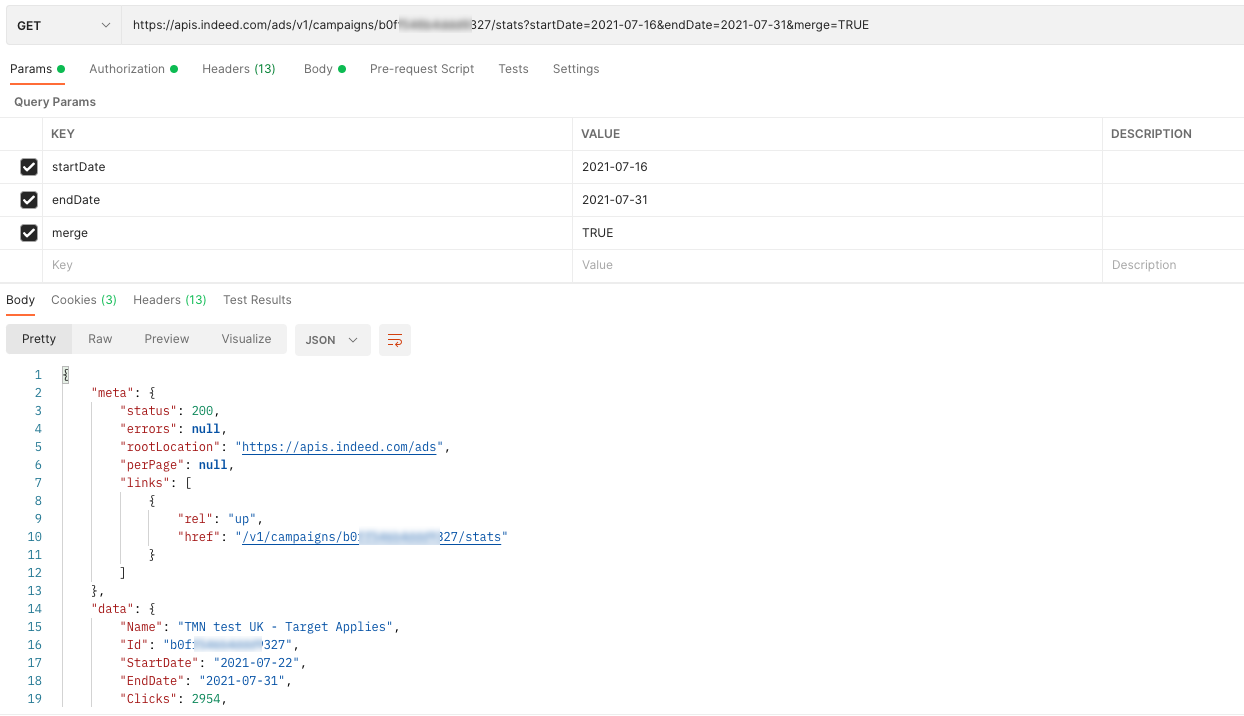
How-to guides for account management
Get employer account information
Get the employer's ID, contact information, and more.
-
Use access token with scopes for employer account.
Get employer account information scope employer_access employer.advertising.account.read
-
Query the account endpoint.
API details for employer account:
API details for employer account API URL https://apis.indeed.com/ads/v1/account(Sponsored Jobs API reference)Request type GETContent type application/jsonAuth OAuth 2.0 bearer token Sample response for employer account:
{"meta": {"status": 200,"errors": null,"rootLocation": "https://apis.indeed.com/ads","perPage": null,"links": null},"data": {"employerId": "a2973d75fd4xxxxxxx748785257446e7","jobSourceList": [{"id": "a284xxxxxxx1c1f9","siteName": "MyCompany"}],"contact": "","company": "My Company Name","id": "4958xxxxxxx3732","email": "myEmailAddress@indeed.com"}}
Get subaccount information
Get a detailed list of subaccounts for a specific master account.
-
Use access token with scopes for subaccount information.
Do not include the
employerparameter when getting the access token for this operation.Get subaccount information scope employer.advertising.subaccount.read
-
Query the subaccounts endpoint.
API details to query subaccounts endpoint:
API details for query subaccounts API URL https://apis.indeed.com/ads/v1/subaccounts(Sponsored Jobs API reference)Request type GETContent type application/jsonAuth OAuth 2.0 bearer token Sample response to query subaccounts endpoint:
{"meta": {"status": 200,"errors": null,"rootLocation": "https://apis.indeed.com/ads","perPage": 2,"links": {"rel": "next","href": "/V1/campaigns/3141xxxxxxxxx793"}},"data": {"SubAccountList": {"id": "3141xxxxxxxxx793","employerId": "4bc39xxxxxxxxx8efbc8486","company": "MyTestCompany","email": "example@mytestcompany.com"}}}
Create a subaccount
Add a subaccount to a master account.
-
Use access token with scopes to create subaccount.
Do not include the
employerparameter when retrieving the access token for this operation.Create subaccount scope employer.advertising.subaccount
-
Create the subaccounts endpoint.
API details to create subaccounts endpoint:
API details for create subaccounts API URL https://apis.indeed.com/ads/v1/subaccounts(Sponsored Jobs API reference)Request type POSTContent type application/jsonAuth OAuth 2.0 bearer token Sample request to create subaccounts endpoint:
{"email": "testsubaccount@mytestcompany.com","currencyCode": "USD","language": "en","employeeCount": "1-49","company": "MyTestCompany2"}Sample response for subaccounts creation:
{"meta": {"status": 200,"errors": null,"rootLocation": "https://apis.indeed.com/ads","perPage": null,"links": null},"data": {"id": "31xxxxxxxxx794","employerId": "4bc39xxxxxxxxx8efbc8486","company": "MyTestCompany2","email": "testsubaccount@mytestcompany.com",}}
Get an account budget
Get the account's monthly budget.
Use access token with scopes for account budget:
scope employer_access employer.advertising.account.read
Get the account budget endpoint. API details to get account budget:
API URL https://apis.indeed.com/ads/v1/account/budget(Sponsored Jobs API reference)Request type GETContent type application/jsonAuth OAuth 2.0 bearer token Sample response for get account budget:
If no budget is set, the
jobsMonthlyBudgetresponse field returnsnull.{"meta":{"status": 200,"errors": null,"rootLocation": "https://apis.indeed.com/ads","perPage": null,"links":[{"rel": "up","href": "/v1/account"}],"data":{"jobsMonthlyBudget": null}}}
Set an account budget
Update the account's monthly budget.
Use access token with scopes to set an account budget.
scope employer_access employer.advertising.account
Query the account budget endpoint.
Set an account budget: API details:
API URL https://apis.indeed.com/ads/v1/account/budget(Sponsored Jobs API reference)Request type PATCHContent type application/jsonAuth OAuth 2.0 bearer token Set an account budget: Sample request:
{ "jobsMonthlyBudget": 20000 }Set an account budget: Sample response:
{"meta": {"status": 200,"errors": null,"rootLocation": "https://apis.indeed.com/ads","perPage": null,"links": [{"rel": "up","href": "/v1/account"}],"data": ""}After you make this update and call Get an Account Budget, you receive the following response:
{"meta":{"status": 200,"errors": null,"rootLocation": "https://apis.indeed.com/ads","perPage": null,"links": ["rel": "up","href": "/v1/account"],"data":{"jobsMonthlyBudget": 20000.00}}}Jobs monthly budget setting in Indeed UI:
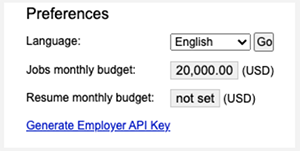
Monthly budget setting in Indeed UI
How-to guides for API quota usage
Get advertiser's API quota usage
Get the advertiser's Sponsored Jobs API usage, quota, and sponsored job spend for the given month.
The API usage count does not show data for the current day. The spend amount represents the total spend up to the current date for the current month, or the total spend for completed months.
- Use access token with scopes for API quota usage details.
| scope | |
|---|
- Call the API quota usage endpoint to get API quota usage:
| API URL |
|
|---|---|
| Request type | GET |
| Content type | application/json |
| Auth | OAuth 2.0 bearer token |
Request parameters for API quota usage:
| Key | Value |
|---|---|
monthYear | Month for which to retrieve quota usage data, in MMyyyy format (e.g., 122024 for December 2024). Cannot be in the future or before December 2024 (122024). Optional - defaults to current month if not provided. |
Sample response for GET API quota usage:
{ "meta": { "status": 200, "errors": null, "rootLocation": "https://apis.indeed.com/ads", "perPage": null, "links": null }, "data": { "mmyyyy": "112024", "apiQuota": 1500, "sponsoredJobsSpendAmount": 3000, "currencyCode": "USD", "apiUsage": [ { "requestsCount": 1000 } ] } }Recommendations and guidelines
Prepare for eventual consistency
The API is expected to adopt an eventual consistency model. For example, when you call POST /v1/campaigns to create a campaign, the GET /v1/campaigns/{campaignId} endpoint might not return the newly created campaign for a brief time.
To handle eventual consistency, avoid reading resources immediately after you create or update them. If the create or update operation returns an HTTP 200, 201, or other successful status code, the changes have been persisted. To verify the success of the operation, you do not need to get the resource.
To read a resource immediately after you create or update it, you might need to introduce a retry mechanism to wait until the creation or update is visible.
Ensure compatibility with API changes
Backwards-compatible changes to the Sponsored Jobs API can be released at any time and without prior notice. Changes considered backwards-compatible include:
- Adding response fields.
- Reordering response fields.
- Changing descriptions of errors.
- Supporting new currencies and objective types.
Your app must follow these guidelines to ensure that backwards-compatible changes don't cause issues:
- Ignore unknown properties in JSON responses.
- Accept properties in any order in JSON responses.
- Use the
typeproperty to distinguish between errors, not thedescription.
Further, if your app works with employer accounts that are not solely managed by your app, it can encounter resources created using another third-party app or Indeed for Employers. Your app must be prepared for these situations:
- Getting or updating campaigns created outside your app could return the
INCOMPATIBLE_API_VERSIONerror. - Campaigns and subaccounts created outside your app could use currency codes not supported by your app. Your app must handle any ISO 4217 currency code.
- Campaigns created outside your app could use objective types not supported by your app. Your app must have fallback logic to handle unexpected objective types.
If you are developing in Java, the popular Jackson library fails on unknown properties by default. To change this behavior, set @JsonIgnoreProperties(ignoreUnknown = true), which disables DeserializationFeature.FAIL_ON_UNKNOWN_PROPERTIES.
FAQs and troubleshooting
FAQs
Indeed does not provide a sandbox environment. You can read data from Indeed APIs in production with no cost or impact to your account. When testing create and update operations, create test campaigns in a paused state (status=paused) to prevent spending.
For more information, see Sponsored Jobs API migration guides.
To clear an account budget, contact your client success representative.
Troubleshoot common errors
This topic describes errors that the Sponsored Jobs API returns. For errors that the authorization endpoints, such as https://apis.indeed.com/oauth/v2/tokens, return, see Troubleshoot authorization errors.
An unsuccessful HTTP status code, such as 400 through 599, indicates that the request failed. The response body contains further details. For example, calling Sponsored Jobs API without an access token results in the following response:
{ "meta": { "status": 401, "errors": [{ "type": "INVALID_TOKEN", "description": "Couldn't find access token in the request. The Authorization header is missing or incorrectly formatted." }], "rootLocation": "https://apis.indeed.com/ads", "perPage": null, "links": null }, "data": null}The errors array in the meta response field contains the error. Every error has a type and a human-readable description. This table describes the common error types.
Because the request path was not prefixed with /ads, the response indicates that the request could not be routed to the Sponsored Jobs API. For example, instead of https://apis.indeed.com/v1/account, use https://apis.indeed.com/ads/v1/account.
{ "fault": { "faultstring": "Unable to identify proxy for host: apis and url: /v1/account", "detail": { "errorcode": "messaging.adaptors.http.flow.ApplicationNotFound" } }}| HTTP status | Error type | Description and common causes |
|---|---|---|
400 | DATE_RANGE_TOO_LONG | Indicates that the Only |
400 | INCOMPATIBLE_API_VERSION | Your app gets or updates a resource that is incompatible with the Sponsored Jobs API version that your app invokes. This error occurs when an entity outside your app creates or modifies the resource. This error is reserved for potential future use and is not currently being returned. |
400 | INVALID_ADVERTISEMENT_ID | The campaign ID included in the request was truncated, included unexpected characters or was otherwise malformed. |
400 | INVALID_REQUEST | A problem occurred with one of the request parameters:
The Unlike other error types, the |
400 | UNACCEPTED_PARAMETER | Specifying the subaccount to access using the Note that the employer IDs accepted by the |
400 | NOT_MASTER_ACCOUNT | This API endpoint can only be called with a master account. For now, this error is only returned from GET /v1/subaccounts and POST /v1/subaccounts. |
401 | INVALID_TOKEN | Request did not include a valid access token:
|
403 | EMPLOYER_ACCESS_TOKEN_NOT_ALLOWED | This API endpoint can't be accessed with an access token representing an employer. This might be because:
|
403 | INSUFFICIENT_SCOPE | The access token was valid but didn't have the scope required for this API endpoint. If you are using the client credentials grant type (2-legged OAuth):
If you are using the authorization code grant type (3-legged OAuth):
Note that
|
403 | LEGACY_ACCESS_TOKEN_NOT_ALLOWED | Sponsored Jobs API no longer supports access tokens that you get through legacy OAuth endpoints. For the updated endpoints, see Integrate with Indeed and call APIs. |
403 | NOT_EMPLOYER_ACCESS_TOKEN | The opposite of the EMPLOYER_ACCESS_TOKEN_NOT_ALLOWED above. This endpoint requires an access token that associates a user account with an employer account. That is, you must specify the employer parameter when requesting the access token. You must do this for most Sponsored Jobs API endpoints. |
404 | RESOURCE_NOT_FOUND | Indicates that there was a problem with the request URL:
|
500 | Any (usually INTERNAL_SERVER_ERROR) | Unexpected error. The problem is sometimes temporary. The same request can succeed after retrying. If retrying the request does not help, a problem with parsing the request might have occurred. Make sure that all the required parameters are present and that all parameters are correctly formatted. If you try to use an access token obtained with the client credentials grant type (2-legged OAuth) with the legacy Sponsored Jobs API endpoint, you also see |
Troubleshoot OAuth errors
See Troubleshoot OAuth errors.