- Integration overview
- Integration steps
- 1. Provide flow to create employer account
- 2. Set up a campaign
- 3. Manage campaigns
- Brand and logo guidelines
- Logo (clear background)
- Logo (white background)
- Logo colors
- Sizing
- Space and dimensions
- Don’t
- Indeed description
- Terms and definitions for Sponsored Jobs API integrations
- Support
- Other resources
Sponsored Jobs API integration guide for UI elements
Use these UI patterns in an Indeed Sponsored Jobs API integration.
Unless you have a written agreement with Indeed regarding your use of Indeed's APIs, by using this API or its documentation, you agree to apply the Indeed API Terms (opens in a new window) and the Additional API Terms and Guidelines to your use of Indeed's APIs.
Integration overview
This guide shows ATS partners the UI patterns for an Indeed Sponsored Jobs API integration. Ads launched through this integration appear on both Indeed and Glassdoor.
As you build your integration, review these requirements:
Integration steps
1. Provide flow to create employer account
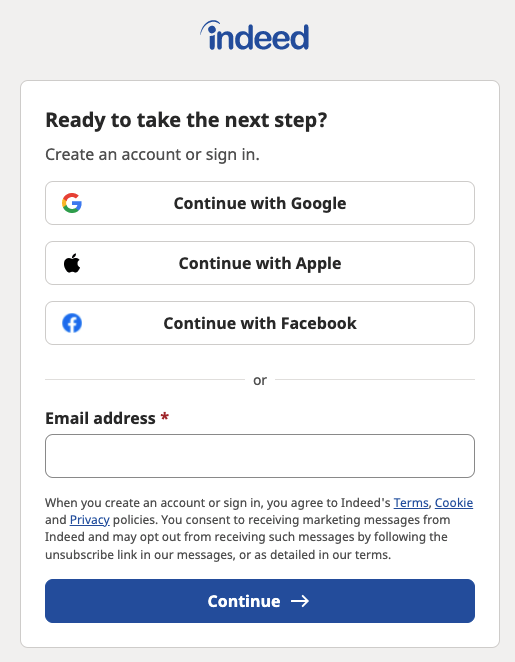
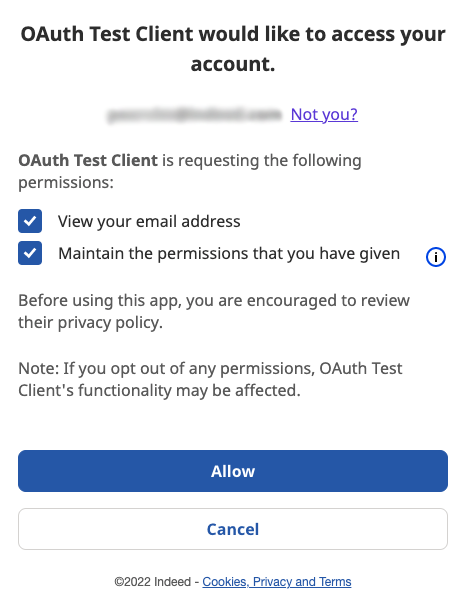
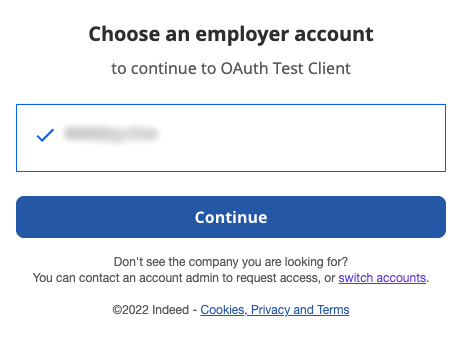
The Sponsored Jobs API uses OAuth to determine a recruiter's Indeed accounts, permissions, and monthly budget. The user must have an Indeed account to use the API.
This flow confirms the account is ready to spend before the user spends money on sponsored jobs.
Feature the Sponsored Jobs integration prominently in your UI and marketplace, with Indeed branding, logos, and its own landing page.
To set up OAuth, see Authorization code grant type (3-legged OAuth).
- If the user has no account, create it inside the ATS.
- Tell users a sponsored campaign is not active until they set up billing with Indeed. They sign in at Indeed - Billing information (opens in a new window) with their Indeed account and enter billing information.
- Include a link to Indeed Account settings (opens in a new window) for later updates.
- Tell clients that an Indeed account lets them view analytics for organic jobs. Include a link to Indeed Analytics (opens in a new window) reports.
- Both parent and child accounts can sign in through the ATS.
- Users manage individual user permissions on Indeed, not in the ATS.
When a user authenticates with OAuth, the flow looks like this:
2. Set up a campaign
After the user has an Indeed account, the user creates a campaign:
Select jobs
-
Select the jobs for the campaign. The API supports single-job and multijob campaigns.
This example shows an ATS where the user selects and sponsors one job at a time:
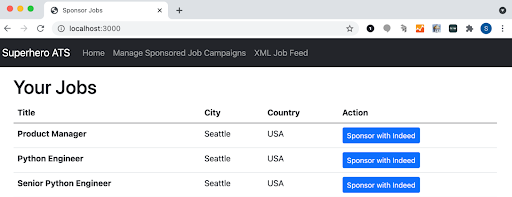
ATS enables the user to select and sponsor one job at a time This example shows multijob selection on Indeed:
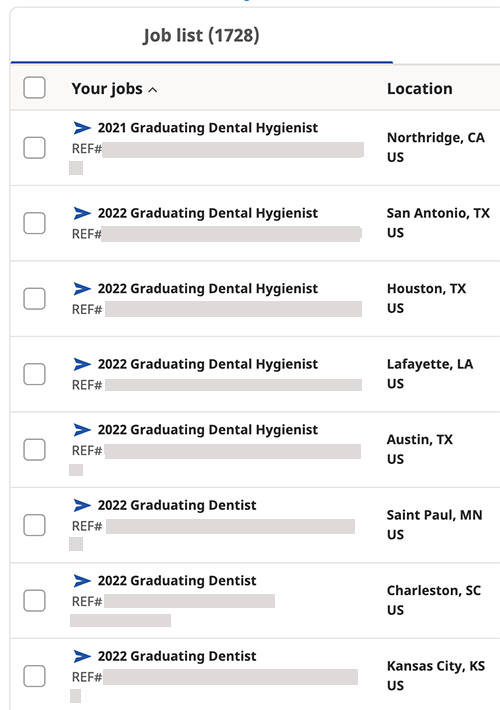
Multijob selection on Indeed -
Select a button to continue.
Make campaign predictions
Campaign prediction requirements apply only in the US.
Based on the selected jobs, Indeed recommends a budget and predicts how many applicants the user can expect in a given time period.
Show these predictions while the user sets the budget.
Always warn that these numbers are estimates based on past performance and do not guarantee future performance.
Add campaign details
After the user selects jobs, the user enters a few details to create the campaign.
The details screen appears on Indeed:

To create a campaign, the user sets the start date, end date, and budget.
Give the user a one-click option to accept the budget the prediction tool suggests. You can also let the user enter a custom budget.
By default, Indeed creates a one-time campaign. The user can instead create a recurring campaign that renews each month, and can prorate the first month's spend.
Review the campaign
After the user selects jobs and enters campaign details, show a summary screen where the user reviews and edits those choices.
This example shows the campaign review screen on Indeed:

3. Manage campaigns
Users must be able to edit these campaign details:
- Start and end dates for single-job and multijob campaigns
- Budget amounts for single-job and multijob campaigns
- Job selection for multijob campaigns only
If the user edits the campaign on Indeed, the ATS reflects the changes automatically.
Campaign performance reporting
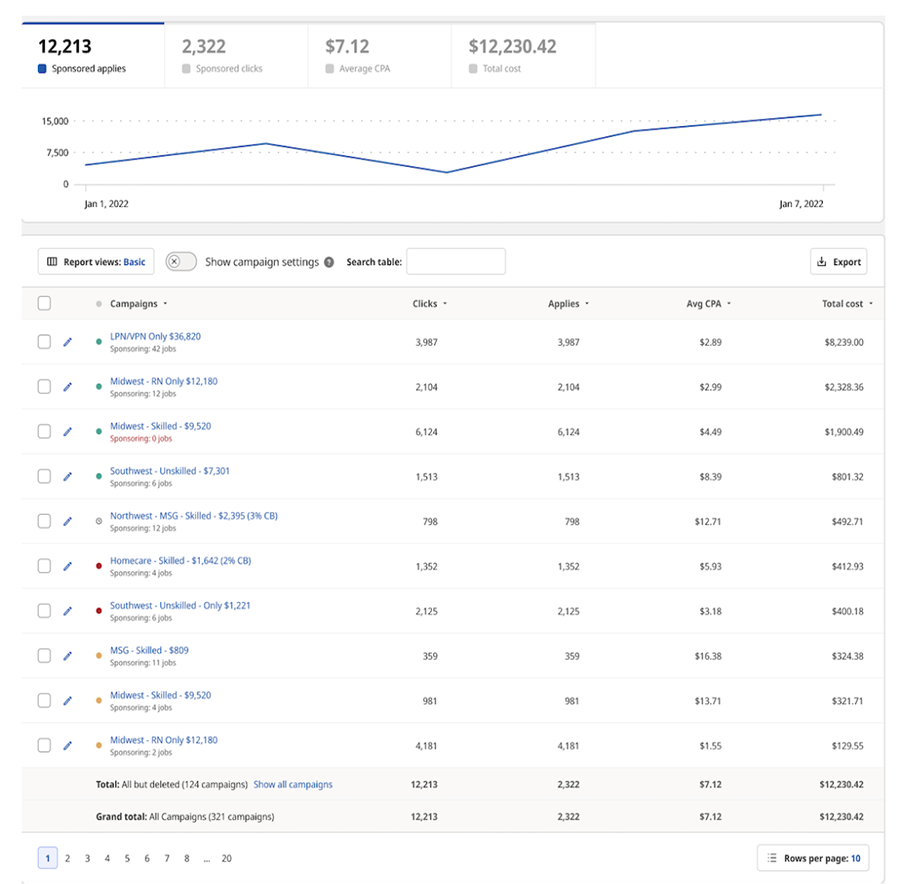
Reporting views on Indeed show how the budget is spent over time and how many applicants are delivered.
If your integration supports only single-job campaigns, provide campaign-level reporting. If it supports multijob campaigns, provide both campaign-level and job-level reporting.
The campaign reports API provides:
- Campaign name and ID
- Organic metrics
- Apply starts
- Clicks
- Impressions
- Conversions, when Indeed Apply is integrated
- Cost, which is the budget already spent
The job reports API provides:
- Campaign ID
- Job title and reference number
- Organic metrics
- Apply starts
- Clicks
- Impressions
- Conversions, when Indeed Apply is integrated
- Cost, which is the budget already spent
This example shows how Indeed reports on multijob campaigns:
Brand and logo guidelines
Logo (clear background)

Logo (white background)

Logo colors
The Indeed logo can appear in Brand Blue, #003a9b, or white. The preferred treatments are Brand Blue on white and white on Brand Blue.
Use the version with the strongest contrast against the background that also fits the design.
Sizing
Minimum size
14px height for digital
10pt height for print
Margin
The logo requires clear space to stay legible.
Use the “e” in the Indeed logotype to measure clear space around the logo, so the space stays proportional at every size.

Space and dimensions
To balance layouts, align the Indeed logo to the letterforms of the wordmark and ignore the arch above the lowercase i.
Apply this rule for centered and right-aligned layouts. Align the logo with major elements such as shapes, text, and buttons.
Don’t
- Alter the logo.
- Squeeze or stretch the logotype.
- Tilt or warp the logotype.
- Violate clear space rules.
- Change the alignment of lockup text.
- Place the logo over a busy image.
- Add a drop shadow to the logotype.
- Fill the logotype with imagery.
- Use any color other than the approved colors.

Indeed description
Short description
Indeed helps millions of job seekers and employers find the right fit every day.
Long description
Indeed is the world's #1 job site1 with more than 250 million unique visitors each month2 and sites in more than 60 countries. By providing access to talent across many fields, Indeed helps employers of every size find and hire the right people.
Integrating with Indeed improves the hiring process and the job seeker experience, and helps employers hire faster. When you opt in to the Indeed integration, external jobs you create or update in your ATS go to Indeed through an XML feed, so your most current job content appears in free3 search results. For more visibility or more quality candidates, you can pay to promote job postings on Indeed.
To learn more, visit Hire faster (opens in a new window).
Terms and definitions for Sponsored Jobs API integrations
- applies
Noun. Applications a job seeker submits.
- applicant tracking system (ATS)
- Human resources software that stores and manages job applicant data.
- budget
- The amount an Indeed customer spends to advertise jobs, usually each month.
- campaign
- Synonym: Sponsorship
- A job post or group of job posts an Indeed client pays to sponsor. A multijob campaign contains more than one job post, but most enterprise campaigns today are single-job campaigns.
- click
Noun. An event where a job seeker selects a job post.
- objective
- An outcome an employer selects when setting up a campaign. For more information, see Setting Up a Sponsored Job Campaign (opens in a new window)
- organic
- Synonym: Free
- The opposite of sponsored. For example, a free job post is an organic job, and its outcomes are organic clicks and organic applies.
- partner
- A person or group that implements a Sponsored Jobs integration. This documentation is written for that audience.
- prediction
- Synonyms: Expected outcome, performance estimate
- Expected performance. Indeed predicts performance for jobs and campaigns based on the budget.
- report
- Performance data for a client's job, campaign, or group of campaigns, including metrics such as impressions and clicks.
- schedule
- Synonyms: Date range, duration
- The time period when a campaign runs.
- sponsored
- Synonyms: Paid, ads
- An Indeed product, service, or outcome a user pays for. For example:
Sponsored jobs are paid job advertisements. Outcomes from sponsored jobs include sponsored clicks and sponsored applies.
- user
- A person who uses the Sponsored Jobs integration.
Support
Clients can get support on the Contact Indeed (opens in a new window) page.
Other resources
For a summary of this topic, see Indeed Sponsored Jobs API UI Guidelines.