- Question sections
schemaVersionscreenerQuestionsdemographicQuestions- JSON questions parameters
idtypequestiontextoptionsvaluelabelrequiredformatlimitminCharCountminmaxminSelectionCountmaxSelectionCountconditionhierarchicalOptionsqualificationvalidationRuleKey- Qualification parameters
typematchrange- Match parameters
typevalues- Range parameters
minmax- Validation Rules
nameaddressphoneemailcompensationalphanumeric_period_dashalphanumeric_bracket_underscore_slashalphanumeric_slashurlanti_xsstax_exemption- Questions types
- textarea
- text
- select
- multiselect
- condition
- hierarchical
- date
- file
- information
- pagebreak
- multifield
- Automatic population of screener question responses
- Questions schema
- Questions example (JSON)
- Questions schema (OpenAPI YAML)
- Best practices
JSON for screener questions reference
JSON screener question parameters.
- By using this API and its documentation and building an integration, you agree to the Additional API Terms and Guidelines.
Systems that support screener questions must implement JSON screener question parameters on Indeed Apply for integration approval.
To surface screener questions in the Indeed Apply application flow, you can either:
-
Format them in JSON and host them at an HTTPS URL that you include in each
<job>in the<indeed-apply-questions>parameter under the<indeed-apply-data>element. See Add Indeed Apply screener questions. -
Call the Job Sync API to create a job posting with screener questions.
The JSON screener question file can be up to 1 MB.
To verify the syntax of your Screener Questions JSON file, use the Indeed Apply Questions tool (opens in a new window).
Do not include phone numbers and email addresses in screener questions. By default, application data includes email addresses. Use Indeed Apply parameters to get phone numbers.
Question sections
schemaVersion
| Description | The version of the Indeed Apply screener questions schema. If you use The current version is 1.3. As Indeed adds features, it releases minor version updates. The delivery postbody includes the schema version as 1.X, such as 1.1 or 1.2. Keep this value flexible so minor version updates do not break your integration. |
|---|---|
| Values | version number |
| Example | |
screenerQuestions
| Description | Use this field for general, well-formatted questions about the job, such as work experience, skills, or certifications. Do not include demographic questions about ethnicity, gender, or disability. Some jurisdictions regulate questions related to protected classes, and both Indeed's systems and your systems must handle them specially. Put demographic questions in the |
|---|---|
| Values | Object |
| Example | |
demographicQuestions
| Description | Use this field for specific, well-formatted questions about a job applicant's protected class, such as ethnicity, gender, or disability. Some jurisdictions regulate these questions, and both Indeed's systems and your systems must handle them specially. Indeed limits demographic questions to U.S.-based jobs for EEO compliance. Do not include general screener questions about work experience, skills, or certifications. Put those in the
|
|---|---|
| Values | Object See JSON questions parameters. |
| Example | |
JSON questions parameters
id
| Description | Unique ID for this question. |
|---|---|
| Values | Any string. |
| Example | |
type
| Description | The question type. For details, see the description of each value. |
|---|---|
| Values | |
| Example | |
question
"type": "information""type": "pagebreak"| Description | The question text that the applicant sees. |
|---|---|
| Values | Any string. |
| Example | |
text
| Description | The text that the applicant sees. Other question types do not support this field. |
|---|---|
| Values | Any string. |
| Example | |
options
"type": "select""type": "multiselect"| Description | The available options. |
|---|---|
| Values | JSON. |
| Example | |
value
"type": "select""type": "multiselect"| Description | The value for each option. |
|---|---|
| Values | Any string. |
| Example | |
label
"type": "select""type": "multiselect"| Description | The text for menu options. Each label in a select or multiselect question must be unique within that question. |
|---|---|
| Values | Any string. |
| Example | |
required
| Description | Set to true to require the question, which forces a non-empty text field or selection. Omit this parameter to make the question optional. If the question is optional and the candidate skips it, Indeed sends an answer value of "". |
|---|---|
| Values | true |
| Example | |
format
"type": "date""type": "text"| Description | The format that the input accepts. For For |
|---|---|
| Values | Text formats:
|
| Example | integer, dd/MM/yyyy |
limit
| Description | For "type": "text" and "type": "textarea", the character limit for the answer. |
|---|---|
| Values | Any integer. |
| Example | |
minCharCount
| Description | For "type": "text" and "type": "textarea", the minimum number of characters for the answer. minCharCount applies only to non-numeric formats. |
|---|---|
| Values | Any integer. |
| Example | |
min
| Description | The minimum accepted answer.
|
|---|---|
| Values | Any integer for Any decimal for Any date for |
| Example | |
max
| Description | The maximum accepted answer.
|
|---|---|
| Values | Any integer for Any decimal for Any date for |
| Example | |
minSelectionCount
| Description | For "multi-select", the minimum number of options that the applicant must select. |
|---|---|
| Values | Any integer. |
| Example | |
maxSelectionCount
| Description | For "multi-select", the maximum number of options that the applicant can select. |
|---|---|
| Values | Any integer. |
| Example | |
condition
| Description | Makes a question conditional on the answer to a previous select question. Specify the id of the previous question and the option value that activates this question. For example, you ask the applicant whether they served in the military. If they answer yes, you show a conditional question that asks which branch they served in. |
|---|---|
| Values | JSON. |
| Example | |
hierarchicalOptions
| Description | A question that shows follow-up questions and answers based on a previous selection. For example, you ask the applicant to choose a state, and then offer a dropdown of cities in that state. Each hierarchical question supports up to three levels. |
|---|---|
| Values | JSON. |
| Example | |
qualification
| Description | Questions that ask the applicant about qualifications that the job might require. The applicant's answer must meet the conditions that the employer specifies. Indeed delivers every application to the employer, whether or not the applicant meets the qualification criteria. Does not support Supported question types are |
|---|---|
| Values | Object. |
| Example | |
validationRuleKey
| Description | A validation rule identifier that, when configured for a question, will reject jobseeker answers that fail the rule.
|
|---|---|
| Values |
See Validation rules. More sets of validation rules may become available in the future. |
| Example | |
Qualification parameters
type
| Description | Indicates the type of qualification, either
|
|---|---|
| Values | enum: "non-blocking" "knockout" |
| Example | |
match
| Description | Indicates the evaluation method for this question is match. The question types are select and multiselect. |
|---|---|
| Values | object See Match parameters. |
| Example | |
range
| Description | Indicates the evaluation method for this question is range. The user's answers must fall within the range that either or both
Only the |
|---|---|
| Values | JSON |
| Example | |
Match parameters
type
| Description | Indicates if the applicant's answer must match "any" or "all" of the provided values. |
|---|---|
| Values | enum: "any" "all" Use Default: "any" |
| Example | |
values
| Description | The values that the applicant must match. |
|---|---|
| Values | array |
| Example | |
Range parameters
min
| Description | The minimum value of the accepted range. |
|---|---|
| Values | Any integer for Any decimal for Any date for |
| Example | |
max
| Description | The maximum value of the accepted range. |
|---|---|
| Values | Any integer for Any decimal for Any date for |
| Example | |
Validation Rules
The following validation rules, when configured for a question, will reject jobseeker answers that include prohibited characters.
name
| Description: valid characters | Name fields: letters, numbers, spaces, and & . ' - " ( ) / º | |
|---|---|
| validationRuleKey | name |
| Regex | |
| Example | |
address
| Description: valid characters | Address fields: letters, numbers, spaces, and , . ' - " ( ) / \ | : # + ! & ; ½ º |
|---|---|
| validationRuleKey | address |
| Regex | |
| Example | |
phone
| Description: valid characters | Phone fields: letters, numbers, spaces, and , . - ( ) : # + / * \ |
|---|---|
| validationRuleKey | phone |
| Regex | |
| Example | |
email
| Description: valid characters | Email fields: letters, numbers, spaces, and . @ " ( ) , : ; < > [ \ ] ! # $ % & ' * + - / = ? ^ _ ` { | } ~ |
|---|---|
| validationRuleKey | email |
| Regex | |
| Example | |
compensation
| Description: valid characters | Compensation fields: letters, numbers, spaces, and , . ( ) + % $ |
|---|---|
| validationRuleKey | compensation |
| Regex | |
| Example | |
alphanumeric_period_dash
| Description: valid characters | Alphanumerics with period and dash: letters, numbers, spaces, and . + - |
|---|---|
| validationRuleKey | alphanumeric_period_dash |
| Regex | |
| Example | |
alphanumeric_bracket_underscore_slash
| Description: valid characters | Alphanumerics with brackets, underscore, and slashes: letters, numbers, spaces, and { } [ ] ( ) _ / + - |
|---|---|
| validationRuleKey | alphanumeric_bracket_underscore_slash |
| Regex | |
| Example | |
alphanumeric_slash
| Description: valid characters | Alphanumerics with slash: letters, numbers, spaces, and / + - |
|---|---|
| validationRuleKey | alphanumeric_slash |
| Regex | |
| Example | |
url
| Description: valid characters | URL fields: letters, numbers, spaces, and - _ . ~ ! * ' ( ) ; : @ & = + $ , / ? % # [ ] |
|---|---|
| validationRuleKey | url |
| Regex | |
| Example | |
anti_xss
| Description: valid characters | Blocks potential injection characters ' " \ / ` and angle brackets < > |
|---|---|
| validationRuleKey | anti_xss |
| Regex | |
| Example | |
tax_exemption
| Description: valid characters | Tax exemption fields: letters, numbers, spaces, and , . ( ) + % $ _ |
|---|---|
| validationRuleKey | tax_exemption |
| Regex | |
| Example | |
Questions types
textarea
A question that shows a multiline text entry field. Use this question type for long-form answers.
{ "id": "envirotext", "type": "textarea", "question": "Describe your ideal work environment:"}text
A question that displays a single-line text field. Use this question type for short answers.
For the formats available for text questions, see the following examples and the JSON screener questions parameters table. The available formats are integer, decimal, and numeric_text.
No format specification
{ "id": "city", "type": "text", "question": "What city are you located in?", "required": true}Integer
Shows whole numbers. Does not accept decimals or leading zeroes.
{ "id": "age", "type": "text", "question": "Age?", "format": "integer", "min": "16", "max": "75"}Numeric text
Accepts numbers with leading zeroes. Does not accept decimals.
{ "id": "experience", "type": "text", "format": "numeric_text", "question": "How many years of experience do you have in this field?", "required": false}Decimal
Shows numbers with decimals. Accepts leading zeroes.
{ "id": "gpa", "type": "text", "format": "decimal", "question": "What was your GPA?", "required": true}select
A question that shows a dropdown menu and lets the applicant select a single answer. Use this question type for multiple-choice questions.
If you include one to five answer options, Indeed shows them as radio buttons. If you include six or more options, Indeed shows them in a dropdown menu.
{ "id": "gender", "type": "select", "question": "Gender?", "options": [{ "value": "0", "label": "Decline to answer" }, { "value": "1", "label": "Male" }, { "value": "2", "label": "Female" }]}multiselect
A question that shows a list of checkboxes and lets the applicant select multiple answers. Use this question type for questions with more than one answer.
{ "id": "favoritecolors", "type": "multiselect", "question": "Select your two favorite colors:", "options": [{ "value": "0", "label": "Maize" }, { "value": "1", "label": "Blue" }, { "value": "2", "label": "Green" }]}condition
A question that appears or hides based on responses to previous questions. For example, you ask the applicant if they are at least 18 years of age. If they answer no, you ask if they can provide the required work documentation.
[{ "id": "profile-atLeast18", "question": "Are you at least 18 years of age?", "required": true, "options": [{ "value": "1", "label": "Yes" }, { "value": "0", "label": "No" }], "type": "select"}, { "id": "profile-permit", "question": "Can you provide a work permit?", "required": true, "condition": { "id": "profile-atLeast18", "value": "0" }, "options": [{ "value": "1", "label": "Yes" }, { "value": "0", "label": "No" }], "type": "select"}]hierarchical
A question that shows follow-up questions and answers based on a previous selection. For example, you ask the applicant to choose a state, and then offer a dropdown of cities in that state. Each hierarchical question supports up to three levels, such as state/city/county.
Hierarchical questions are similar to conditional questions, but they fit cases where the first selection determines the answer set for later questions. Use the hierarchical pattern to reduce the number of questions you need to gather related information.
demographicQuestions does not support this question type.
[{ "id": "hierarchical", "type": "hierarchical", "question": "State", "required": true, "options": [{ "value": "0", "label": "California" }, { "value": "1", "label": "Texas" }, { "value": "2", "label": "New York" }], "hierarchicalOptions": [{ "id": "cali_cities", "options": [{ "value": "0", "label": "San Francisco" }, { "value": "1", "label": "Los Angeles" }], "condition": { "id": "hierarchical", "value": "0" } }, { "id": "texas_cities", "options": [{ "value": "0", "label": "San Antonio" }, { "value": "1", "label": "Austin" }], "condition": { "id": "hierarchical", "value": "1" } }, { "id": "sa_zipcodes", "options": [{ "value": "0", "label": "78212" }, { "value": "1", "label": "78209" }], "condition": { "id": "texas_cities", "value": "0" } }]}]date
A question that shows a text field that only accepts date entry. Use this question type for questions that the applicant must answer with a date.
Specify a format for this question type by using dd/MM/yyyy or another locale-specific format that follows Unicode CLDR formatting.
Indeed parses date patterns using Java's SimpleDateFormat engine, which is case-sensitive. Malformed patterns are permitted, but incorrect tokens cause data corruption and intent mismatches for both job seekers and employers.
The type=date format affects how Indeed sends the application to the ATS and how Indeed parses minimum and maximum values. The job seeker enters the date in their locale, not in the format you specify, and Indeed shows validation errors in the job seeker's locale.
To prevent data loss, use only the following standard tokens for type=date configurations: yyyy (calendar year), MM or M (numeric month), and dd or d (day of month). Indeed plans to deprecate support for non-standard or malformed tokens.
The following tokens are common sources of misconfiguration. Do not use them in a type=date format string.
| Token | Description | Misconfiguration | Use instead |
|---|---|---|---|
mm | Minutes in hour (0–59) | Produces minute-of-hour values (0–59) in place of the month. Jobs configured this way silently emit incorrect month values. For example, this token might render 03 only if the current system minute happens to be 3 at the time of processing. | MM |
YYYY / YY | Week-based year (ISO week year) | Diverges from the calendar year around December and January boundaries. For example, 2025-12-29 can render as 2026 because it calculates based on the ISO week year. This issue is difficult to detect during standard testing until a year-end boundary is crossed. | yyyy |
yy | 2-digit year | Leaves the century ambiguous. For example, a two-digit year entry of 24 could be interpreted as 1924 or 2024 depending on the system's parsing threshold. | yyyy |
DD / D | Day in year (1–366) | Produces the day-of-year (1–366) instead of the day-of-month (1–31). For example, 2025-03-15 incorrectly evaluates to day 074. | dd |
{ "id": "startdate", "required": true, "type": "date", "question": "Start date?", "format": "dd/MM/yyyy", "min": "01/06/2023", "max": "03/10/2023"}file
A question that shows a file upload control. Use this question type for questions that require a file as the answer, such as certifications, portfolios, or work samples. As described in Application data reference, the JSON POST request returns three answer fields: contentType, data, and fileName.
Valid file types are:
docdocxgifjfifjifjpejpegjpgpdfpngrtftiftifftxt
Each file is limited to 5 MB. Each application is limited to 15 MB total, including the resume file.
Do not use this question type to collect resumes. Use the Indeed Apply Resume configuration parameter instead.
demographicQuestions does not support this question type.
{ "id": "file2", "type": "file", "question": "Please attach a recent example of your work.", "required": true, "min": "1", "max": "3"}information
A text display that does not require a response. Use this question type for explanatory text or section headings.
You can include these HTML elements in the text:
<b><p><br><li><ul><ol><a href=" ">
URLs accept only HTTP and HTTPS protocols. Links open in a new tab.
Do not use <br> to force line breaks after paragraphs. Indeed inserts line breaks between paragraphs automatically.
The information question type does not support the condition JSON question parameter. See the JSON screener questions parameters table.
[{ "id": "first_header", "type": "information", "text": "The next set of questions is <b>optional</b> and are for recording purposes only. View the <a href = 'http://www.eeoc.gov/employers/upload/poster_screen_reader_optimized.pdf'> EEO is the Law </a> poster.", "fontsize": 8}]pagebreak
Groups questions on a page. Indeed displays all questions between two pagebreak types on the same page. You can group up to 20 questions on the same page. By default, Indeed displays 3 questions per page on desktop and groups all questions onto a single page on mobile.
[{ "id": "page1_open", "type": "pagebreak"}, { "id": "question_sample", "type": "text", "question": "Age?"}, { "id": "page1_close", "type": "pagebreak"}]multifield
A question that displays a customizable “add more” button that allows job seekers to add multiple entries such as multiple work experiences, education history answers. Each entry collects a group of fields defined in the multifield question’s groupedQuestionFields array. This required array contains 1 to 20 related questions of the following types:
texttextareaselectmultiselectdatefilehierarchicalcondition
Note: Nested multifield questions are prohibited. No question within groupedQuestionFields can be a multifield question.
By default, if not explicitly set, minEntryCount is 1 and maxEntryCount is 15.
The configuration must adhere to the following rules:
- Definition: One count represents one entry of the answers to the questions within
groupedQuestionFields. - Limits:
minEntryCountcannot be negative, andmaxEntryCountmust be between 1 and 20. - Validation:
maxEntryCountmust always be greater than or equal tominEntryCount.
For example, this multifield asks the job seeker to provide information about their education.
{ "id": "education", "type": "multifield", "question": "Please enter your education history (up to 10)", "minEntryCount": 1, "maxEntryCount": 10, "groupLabel": "Education", "addButtonLabel": "Add Another Education Entry", "groupedQuestionFields": [ { "id": "school_name", "question": "School Name", "type": "text", "required": true, "limit": 100 }, { "id": "degree", "question": "Degree Title", "type": "text", "required": true, "limit": 100 }, ]}A job seeker’s first answer might include “Texas A&M” and “Bachelor’s Degree.” Their second answer might include “The University of Texas at Austin” and “Master’s Degree.” Due to "minEntryCount": 1, the job seeker must provide one answer. Due to "maxEntryCount": 10, the jobseeker may not provide more than 10 answers.
To require a job seeker to provide at least one entry with at least one answered question in the groupedQuestionFields array, set the multifield question’s minEntryCount to a number greater than 0. To require a response to a specific question within the groupedQuestionFields array, set the question’s required to true.
To customize the text of the “add more” button, set addButtonLabel. To customize the text that identifies the group of questions in the groupedQuestionFields array, set groupLabel.
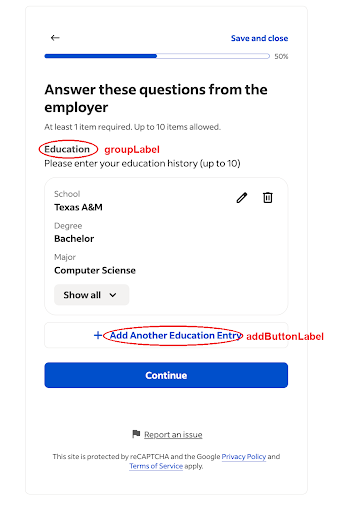
Set condition on a multifield question to make the entire multifield question dependent on a different top-level, sibling question. A condition on a multifield question can not be dependent on a question inside a groupedQuestionFields array.
Set condition on a question within the groupedQuestionFields array to make that question dependent on another question within the same groupedQuestionFields array. A condition inside a groupedQuestionFields array can not be dependent on a question outside of the same array. See condition for more details.
{ "id": "work_experience", "type": "multifield", "question": "Please enter your past work experience (up to 10)", "minEntryCount": 1, "maxEntryCount": 10, "groupLabel": "Work Experience", "addButtonLabel": "Add Another Work Experience", "groupedQuestionFields": [ { "id": "company_name", "question": "Company Name", "type": "text", "required": true, "limit": 100 }, { "id": "job_title", "question": "Job Title", "type": "text", "required": true, "limit": 100 }, { "id": "start_date", "question": "Start Date", "type": "date", "format": "MM/yyyy", "required": true }, { "id": "end_date", "question": "End Date", "type": "date", "format": "MM/yyyy", "required": false }, { "id": "responsibilities", "question": "Key Responsibilities", "type": "textarea", "required": false, "limit": 500, "minCharCount": 50 } ]}Automatic population of screener question responses
Only for Japan.
Indeed might automatically pre-populate answers to certain screener questions from a job seeker's previous application.
Indeed only pre-populates answers when the question text or question type matches specific rules.
| Item category | Suggested Question sample |
|---|---|
| Last name furigana | Last name furigana, last name furigana |
| First name furigana | First name furigana, first name furigana |
| Name pronunciation | Furigana, furigana |
| Date of birth (year) | Date of birth (year), Date of birth year |
| Date of birth (month) | Date of birth (month), Date of birth month |
| Date of birth (day) | Date of birth (day), Date of birth day |
| Date of birth | Date of birth |
| Gender | Gender |
| Prefecture | Prefecture |
| Nearest train station | Nearest train station |
| Occupation | Occupation, current occupation |
| Postal code | Postal code |
| Municipality | Municipality, city or ward / town or village |
| Town name / address number | Town name and address number, Town name / address number |
| Building name / room number | Building name, building name / room number, address |
| Marital status | Married, unmarried |
Questions schema
Deprecation notice: As of December 8, 2025, Indeed no longer supports version 0.0 of the screener question schema. Upgrade your screener question integration to schema version 1.x. Integrations that still use version 0.0 break, and job seekers are redirected to apply on the employer's company website. Minor upgrades (for example, 1.0 to 1.1) do not break your integration and require no action. Major upgrades are infrequent and require action; the next major upgrade is not expected until 2026.
This schema describes an endpoint that the ATS hosts and Indeed queries. It represents questions that an employer wants to pose to a job seeker in a job application that Indeed Apply administers.
Questions example (JSON)
{ "schemaVersion": "1.0", "screenerQuestions": { "questions": [{ "id": "favorite-widget-color", "type": "text", "question": "What is your favorite widget color?" "validationRuleKey": "anti_xss" }, { "id": "last-four-social-security", "type": "text", "question": "What are the last four digits of your social security number??", "format": "numeric_text" }, { "id": "org-annual-widget-volume", "type": "text", "question": "How many widgets can you craft in an hour?", "required": true, "format": "integer", "min": 0, "max": 100 }, { "id": "widget-passion", "type": "textarea", "question": "What makes you passionate about widget crafting?" }, { "id": "widget-crafting-license", "type": "select", "question": "Do you have a widget crafting license issued by the Widget Organization for Widgets?", "required": true, "options": [{ "label": "false", "value": "0" }, { "label": "true", "value": "1" }] }, { "id": "widget-crafting-license-certifications", "type": "multiselect", "question": "Please select all certifications on your widget crafting license.", "required": true, "options": [{ "label": "Wooden Widget Certification", "value": "0" }, { "label": "Plastic Widget Certification", "value": "1" }, { "label": "Quantum Foam Widget Certification", "value": "3" }], "condition": { "id": "widget-crafting-license", "value": "1" }, "qualification": { "type": "non-blocking", "match": { "type": "any", "values": ["1", "3"] } } }, { "id": "widget-crafting-state", "type": "hierarchical", "question": "What is the most recent US state, city, and zip code in which you've crafted widgets?", "options": [{ "label": "California", "value": "0" }, { "label": "Texas", "value": "1" }], "hierarchicalOptions": [{ "id": "cali-cities", "options": [{ "label": "SanFrancisco", "value": "0" }], "condition": { "id": "widget-crafting-state", "value": "0" } }, { "id": "texas-cities", "options": [{ "label": "San Antonio", "value": "0" }, { "label": "Austin", "value": "1" }], "condition": { "id": "widget-crafting-state", "value": "1" } }, { "id": "san-antonio-zips", "options": [{ "label": "78212", "value": "0" }, { "label": "78209", "value": "1" }], "condition": { "id": "texas-cities", "value": "0" } }] }, { "id": "widget-crafting-license-expiration", "type": "date", "question": "When does your widget crafting license expire?", "required": true, "format": "dd/MM/yyyy", "condition": { "id": "widget-crafting-license", "value": "1" } }, { "id": "favorite-widget-pic", "type": "file", "question": "Please upload a picture of your most handsomely crafted widget." }, { "id": "prior-widget-roles", "type": "multifield", "question": "List your previous widget-crafting roles.", "groupLabel": "Widget role", "addButtonLabel": "Add another role", "minEntryCount": 1, "maxEntryCount": 5, "groupedQuestionFields": [{ "id": "role-employer", "type": "text", "question": "Employer name" }, { "id": "role-title", "type": "text", "question": "Role title" }, { "id": "role-start-date", "type": "date", "question": "Start date", "format": "dd/MM/yyyy" }] }, { "id": "page-1", "type": "pagebreak" }, { "id": "strange-widget-disclosure", "type": "information", "text": "The widgets we produce are sometimes flavored strange. By applying to this job you agree that you are comfortable crafting strange flavored widgets." }] }, "demographicQuestions": { "questions": [{ "id": "disabilities", "type": "select", "question": "Do you have a disability?", "options": [{ "label": "false", "value": "0" }, { "label": "true", "value": "1" }], "required": false }] }}Questions schema (OpenAPI YAML)
info: title: "Indeed Questions Schema" description: "This defines Indeed's Application Questions schema. As a client of\ \ Indeed who wishes to utilize Indeed Apply to administer job application questions\ \ to job seekers, you must host these this API on a server of your choice. The\ \ schema defines job application questions you or your customer would like to\ \ pose to job seekers through the Indeed Apply product." version: "1.0"servers:- url: "https://YourQuestionsEndpoint.com"tags:- name: "Job Application Question Fetching" description: "Question lists that Indeed will fetch from your configured **indeed-apply-questions**\ \ URL when rendering your job application for a job seeker\n\nCHANGE LOG for this\ \ version:\n* ***BREAKING!*** Root changed to object instead of array\n* Added\ \ root fields ```schmeaVersion```, ```screenerQuestions```, ```demographicQuestions```\n\ * Added ```qualification``` field/concept to numeric\ \ literal, date, select and multiselect question types\n* Added the ```multifield```\ \ question type, a repeatable group of sub-questions (sub-fields)\n"paths: /questions: get: tags: - "job application question fetching" summary: "Fetch job application questions" description: "Returns all the questions Indeed needs to faithfully render your\ \ job application for a job seeker" responses: "200": description: "successful operation" content: application/json: schema: $ref: "#/components/schemas/QuestionsBody" example: schemaVersion: "1.0" screenerQuestions: questions: - id: "favorite-widget-color" type: "text" question: "What is your favorite widget color?" validationRuleKey: "anti_xss" - id: "org-annual-widget-volume" type: "text" question: "What are the last four digits of your social security\ \ number??" format: "numeric_text" - id: "last-four-social-security" type: "text" question: "How many widgets can you craft in an hour?" required: true format: "integer" min: 0 max: 100 - id: "widget-passion" type: "textarea" question: "What makes you passionate about widget crafting?" - id: "widget-crafting-license" type: "select" question: "Do you have a widget crafting license issued by the\ \ Widget Organization for Widgets?" required: true options: - label: "false" value: "0" - label: "true" value: "1" - id: "widget-crafting-license-certifications" type: "multiselect" question: "Please select all certifications on your widget crafting\ \ license." required: true options: - label: "Wooden Widget Certification" value: "0" - label: "Plastic Widget Certification" value: "1" - label: "Quantum Foam Widget Certification" value: "3" condition: id: "widget-crafting-license" value: "1" qualification: type: "non-blocking" match: type: "any" values: - "1" - "2" - id: "widget-crafting-state" type: "hierarchical" question: "What is the most recent US state, city, and zip code\ \ in which you've crafted widgets?" options: - label: "California" value: "0" - label: "Texas" value: "1" hierarchicalOptions: - id: "cali-cities" options: - label: "SanFrancisco" value: "0" condition: id: "widget-crafting-state" value: "0" - id: "texas-cities" options: - label: "San Antonio" value: "0" - label: "Austin" value: "1" condition: id: "widget-crafting-state" value: "1" - id: "san-antonio-zips" options: - label: "78212" value: "0" - label: "78209" value: "1" condition: id: "texas-cities" value: "0" - id: "widget-crafting-license-expiration" type: "date" question: "When does your widget crafting license expire?" required: true format: "dd/MM/yyyy" condition: id: "widget-crafting-license" value: "1" - id: "favorite-widget-pic" type: "file" question: "Please upload a picture of your most handsomely crafted\ \ widget." - id: "prior-widget-roles" type: "multifield" question: "List your previous widget-crafting roles." groupLabel: "Widget role" addButtonLabel: "Add another role" minEntryCount: 1 maxEntryCount: 5 groupedQuestionFields: - id: "role-employer" type: "text" question: "Employer name" - id: "role-title" type: "text" question: "Role title" - id: "role-start-date" type: "date" question: "Start date" format: "dd/MM/yyyy" - id: "page-1" type: "pagebreak" - id: "strange-widget-disclosure" type: "information" text: "The widgets we produce are sometimes flavored strange.\ \ By applying to this job you agree that you are comfortable\ \ crafting strange flavored widgets." demographicQuestions: questions: - id: "disabilities" type: "select" question: "Do you have a disability?" options: - label: "false" value: "0" - label: "true" value: "1" required: false "404": description: "Questions not found"components: schemas: QuestionsBody: title: "Questions Body" type: "object" required: - "schemaVersion" properties: schemaVersion: type: "string" description: "This is the [semantic version](https://semver.org) of the\ \ schema. (Or rather, the semantic-version-light. We do not use the 3rd\ \ (PATCH) element.)" screenerQuestions: type: "object" properties: questions: allOf: - $ref: "#/components/schemas/QuestionsList" - description: "The screener questions should be a list of general,\ \ well formatted questions pertaining to the underlying job such\ \ as work experience, skills, certifications, and so on It should ***NOT***\ \ contain demographic questions such as question about ethnicity,\ \ gender, or disability. Questions related to \"protected classes\"\ \ of people are regulated in certain jurisdictions meaning they\ \ must be handled in special ways inside Indeed systems (and potentially\ \ yours). This schema provides a separate list for demographic questions\ \ called \"demographicQuestions\" below." demographicQuestions: type: "object" properties: questions: allOf: - $ref: "#/components/schemas/QuestionsList" - description: "The demographics questions should be a list of specific,\ \ well formatted questions pertaining to the job applicant's \"\ protected class\" (such as ethnicity, gender, disability, and so on). These\ \ sorts of questions are regulated in certain jurisdictions meaning\ \ they must be handled in special ways in Indeed systems (and potentially\ \ yours). Please do not mix general screener questions such as\ \ those pertaining to work experience, skills, or certifications\ \ into this list. Instead place them in the \"screenerQuestions\"\ \ list above." QuestionsList: title: "Questions List" type: "array" items: $ref: "#/components/schemas/Question" example: questionPlatform: questionSetId: "abc123" Question: type: "object" anyOf: - $ref: "#/components/schemas/TextQuestion" - $ref: "#/components/schemas/TextAreaQuestion" - $ref: "#/components/schemas/SelectQuestion" - $ref: "#/components/schemas/HierarchicalQuestion" - $ref: "#/components/schemas/DateQuestion" - $ref: "#/components/schemas/FileQuestion" - $ref: "#/components/schemas/MultifieldQuestion" - $ref: "#/components/schemas/InformationText" - $ref: "#/components/schemas/PagebreakFormating" discriminator: propertyName: "type" mapping: text: "#/components/schemas/TextQuestion" textarea: "#/components/schemas/TextAreaQuestion" select: "#/components/schemas/SelectQuestion" multiselect: "#/components/schemas/SelectQuestion" hierarchical: "#/components/schemas/HierarchicalQuestion" date: "#/components/schemas/DateQuestion" file: "#/components/schemas/FileQuestion" multifield: "#/components/schemas/MultifieldQuestion" information: "#/components/schemas/InformationText" pagebreak: "#/components/schemas/PagebreakFormating" TextQuestion: title: "Text Question" type: "object" description: "Displays a single-line text entry field and is used for questions\ \ with shorter answers." anyOf: - $ref: "#/components/schemas/PureTextQuestionAddIn" - $ref: "#/components/schemas/NumericTextQuestionAddIn" - $ref: "#/components/schemas/NumericLiteralTextQuestionAddIn" example: id: "text-question-id" type: "text" question: "What short piece of info are you willing to provide?" required: true PureTextQuestionAddIn: title: "Pure Text Question Add-In" type: "object" properties: validationRuleKey: type: "string" description: "Key for a validation rule that, when configured for a question, rejects job seeker answers that fail the rule. Supported for pure text questions. For the list of available validationRuleKey values, see [Validation rules](https://docs.indeed.com/indeed-apply/screener-questions#validation-rules)." example: id: "text-format-default-id" type: "text" question: "Can you provide some normal text?" required: true NumericTextQuestionAddIn: title: "Numeric Text Question Add-In" type: "object" description: "Allows for numbers with leading zeroes; does not allow for decimals." required: - "format" properties: format: type: "string" enum: - "numeric_text" validationRuleKey: type: "string" description: "Key for a validation rule that, when configured for a question, rejects job seeker answers that fail the rule. Supported for text questions with format numeric_text. For the list of available validationRuleKey values, see [Validation rules](https://docs.indeed.com/indeed-apply/screener-questions#validation-rules)." example: id: "text-format-numeric-id" type: "text" question: "Can you provide some numeric text with leading zeros such as 01234?" required: false format: "numeric_text" NumericLiteralTextQuestionAddIn: title: "Numeric Literal Text Question Add In" anyOf: - $ref: "#/components/schemas/DecimalTextQuestionAddIn" - $ref: "#/components/schemas/IntegerTextQuestionAddIn" DecimalTextQuestionAddIn: title: "Decimal Text Question Add-In" type: "object" description: "Numbers with decimals; allows for leading zeroes." required: - "format" properties: format: type: "string" enum: - "decimal" min: type: "number" description: "The minimum value for the answer" max: type: "number" description: "The maximum value for the answer" qualification: $ref: "#/components/schemas/QualificationDecimal" example: id: "text-format-integer" type: "text" question: "Can you provide a decimal between 0.665 and 100.1 inclusive?" required: true format: "decimal" min: 0.665 max: 100.1 QualificationDecimal: title: "Qualification Decimal" allOf: - $ref: "#/components/schemas/QualificationBase" - type: "object" properties: range: type: "object" description: "Indicates the evaluation method for this question is range,\ \ meaning that the user’s answers must fall within the range defined\ \ by the provided ```min``` and/or ```max``` values" anyOf: - required: - "min" properties: min: type: "number" max: type: "number" example: min: 4.5 - required: - "max" properties: min: type: "number" max: type: "number" example: min: 4.5 max: 60.33 QualificationBase: title: "Qualification Base" type: "object" description: "Indicates this question contains the need to\ \ assess if the given answer is correct.\n\nSupported for conditional schema.\ \ Not supported for hierarchical. \n\nQualification questions are marked as\ \ required for applicants to answer\n" required: - "type" properties: type: type: "string" enum: - "non-blocking" description: "Indicates the type of qualification in regards to the effect\ \ on the user’s application in the indeed apply flow.\n * ```non-blocking```\ \ will allow the user to move to the next section\ \ in the apply flow even if the answer does not meet the specification\ \ defined in the qualification.\n" IntegerTextQuestionAddIn: title: "Integer Text Question Add-In" type: "object" description: "Whole numbers; does not allow for decimals or leading zeroes." properties: format: type: "string" enum: - "integer" min: type: "integer" description: "The minimum value for the answer" max: type: "integer" description: "The maximum value for the answer" qualification: $ref: "#/components/schemas/QualificationInteger" example: id: "text-format-integer" type: "text" question: "Can you provide an integer between 0 and 100 inclusive?" required: true format: "integer" min: 0 max: 100 QualificationInteger: title: "Qualification Integer" type: "object" description: "Indicates the evaluation method for this question is range, meaning\ \ that the user’s answers must fall within the range defined by the provided\ \ ```min``` and/or ```max``` values" allOf: - $ref: "#/components/schemas/QualificationBase" - type: "object" properties: range: type: "object" anyOf: - required: - "min" properties: min: type: "integer" max: type: "integer" example: min: 4 max: 60 - required: - "max" properties: min: type: "integer" max: type: "integer" example: max: 60 TextAreaQuestion: title: "Text Area Question" type: "object" description: "Displays a multi-line text entry field and is used for questions\ \ with long-form answers." allOf: - $ref: "#/components/schemas/TextualQuestionBase" - type: "object" required: - "type" properties: type: type: "string" enum: - "textarea" example: id: "textarea-question-id" type: "text" question: "What deep concepts are you thinking about?" required: true TextualQuestionBase: title: "Textual Question Base" type: "object" allOf: - $ref: "#/components/schemas/QuestionBase" - type: "object" properties: limit: type: "integer" description: "The character limit for the answer" validationRuleKey: type: "string" description: "A validation rule that, when configured for a question, rejects job seeker answers that fail the rule. Supported for all text area questions. For the list of available validationRuleKey values, see [Validation rules](https://docs.indeed.com/indeed-apply/screener-questions#validation-rules). QuestionBase: title: "Question Base" type: "object" allOf: - $ref: "#/components/schemas/QuestionItemBase" - type: "object" required: - "question" properties: question: type: "string" description: "The question text that the applicants see." required: type: "boolean" description: "If set to true, the question is required, which produces\ \ a non-empty text field or selection. Omit this parameter to define\ \ questions as optional. If a question is optional and the candidate\ \ chooses not to answer, Indeed sends an answer value of \"\"." condition: type: "object" description: "Marks a question as conditional, depending on the answer\ \ to a previous select question. Specify the id of the previous question\ \ as well as the option value that activates this question. For example,\ \ you might ask the applicant if the have a pertinent license. If they\ \ answer yes, you display a conditional question that asks when it expires." properties: id: type: "string" description: "The unique question id on which the display of this\ \ question depends." value: type: "string" description: "The value that the dependent questions answer must match\ \ before this condition question is displayed." QuestionItemBase: title: "Question Item Base" type: "object" required: - "id" properties: id: type: "string" description: "Unique ID for this question." SelectQuestion: title: "Select Question" type: "object" description: "Types:\n- ***select*** - A question that displays a dropdown menu\ \ that allows the applicant to select a single answer. Used for questions\ \ with multiple choice answers.\n - Note: If you include from 1 to 5 answer\ \ options, they appear with radio buttons. If you include from 6 or more answer\ \ options, they appear in a dropdown menu.\n- ***multiselect*** - A question\ \ that displays a list of checkboxes that enables the applicant to select\ \ multiple answers. Used for questions with multiple answers.\n" allOf: - $ref: "#/components/schemas/QuestionBase" - type: "object" required: - "type" - "options" properties: type: type: "string" enum: - "select" - "multiselect" options: $ref: "#/components/schemas/SelectOptions" qualification: anyOf: - $ref: "#/components/schemas/QualificationSelect" - $ref: "#/components/schemas/QualificationMultiselect" discriminator: propertyName: "type" mapping: select: "#/components/schemas/QualificationSelect" multiselect: "#/components/schemas/QualificationMultiselect" example: id: "select-question-id" type: "select" question: "Please select an option below." required: true options: - label: "no" value: "0" - label: "yes" value: "1" SelectOptions: title: "Select Options" type: "array" items: type: "object" required: - "label" - "value" properties: label: type: "string" value: type: "string" QualificationSelect: title: "Qualification Select" allOf: - $ref: "#/components/schemas/QualificationBase" - type: "object" properties: match: type: "object" description: "Indicates the evaluation method for this question is match,\ \ meaning that the user’s answers must match ```any``` of the provided\ \ values" required: - "values" properties: values: type: "array" items: type: "string" type: type: "string" enum: - "any" default: "any" QualificationMultiselect: title: "Qualification Multiselect" allOf: - $ref: "#/components/schemas/QualificationBase" - type: "object" properties: match: type: "object" description: "Indicates the evaluation method for this question is match,\ \ meaning that the user’s answers must match ```any``` or ```all```\ \ of the provided values" required: - "values" properties: values: type: "array" items: type: "string" type: type: "string" enum: - "all" - "any" default: "any" HierarchicalQuestion: title: "Hierarchical Question" type: "object" description: "A question that displays additional questions and responses based\ \ on previously selected answers. For example, you might ask an applicant\ \ to choose a state. Then, depending on what they select, you could offer\ \ them a dropdown list of cities within that state. Additionally could ask\ \ for a zip code within the city they select. Each hierarchical question is\ \ limited to three levels. For example state -> city -> zip.\nNote: Hierarchical\ \ questions are similar to conditional questions. However, hierarchical questions\ \ may be better suited to certain question types where an initial selection\ \ defines potential answers for subsequent questions. Using the hierarchical\ \ functionality reduces the total number of questions needed to obtain related\ \ information.\n" allOf: - $ref: "#/components/schemas/QuestionBase" - type: "object" required: - "type" - "options" properties: type: type: "string" enum: - "hierarchical" options: $ref: "#/components/schemas/SelectOptions" hierarchicalOptions: type: "array" items: required: - "id" properties: id: type: "string" description: "The identifier of the hierarchical option" options: $ref: "#/components/schemas/SelectOptions" condition: type: "object" required: - "id" - "value" properties: id: type: "string" value: type: "string" example: id: "hierarchical-question-top-id" type: "hierarchical" question: "Can you navigate this nested hierarchy?" options: - label: "Top-level A" value: "0" - label: "Top-level B" value: "1" - label: "Top-level C" value: "2" hierarchicalOptions: - id: "top-level-a-mids-id" options: - label: "Top-level A -> Mid-level 1" value: "0" - label: "Top-level A -> Mid-level 2" value: "1" condition: id: "hierarchical-question-top-id" value: "0" - id: "top-level-b-mids-id" options: - label: "Top-level B -> Mid-level 1" value: "0" - label: "Top-level B -> Mid-level 2" value: "1" condition: id: "hierarchical-question-top-id" value: "1" - id: "top-level-b-mid-1-lows-id" options: - label: "78212" value: "0" - label: "78209" value: "1" condition: id: "top-level-b-mids-id" value: "0" DateQuestion: title: "Date Question" type: "object" description: "A question that displays a text field that only accepts date entry.\ \ Used for questions that must be answered with a date.\nNote: Format is required\ \ when using this screener question type. The format must be dd/MM/yyyy or\ \ another locale specific format that meets Unicode CLDR formatting.\n Indeed\ \ uses the SimpleDateFormat, so month must be formatted as MM. Using mm results\ \ in misconfiguration.\n The format of type=date impacts how the application\ \ is passed to the ATS and the parsing of minimum and maximum values. The\ \ job seeker still enters the date based on their locale, not the specified\ \ format, and validation error messages are in their locale’s format. Use\ \ yyyy instead of yy in the format to prevent confusion.\n" allOf: - $ref: "#/components/schemas/QuestionBase" - type: "object" required: - "type" - "format" properties: type: type: "string" enum: - "date" format: type: "string" enum: - "dd/MM/yyyy" - "integer" min: type: "string" max: type: "string" qualification: $ref: "#/components/schemas/QualificationDate" example: id: "date-question-id" type: "date" question: "Do you have a favorite date?" required: true format: "dd/MM/yyyy" condition: id: "select-question-id" value: "1" QualificationDate: title: "Qualification Date" type: "object" description: "Indicates the evaluation method for this question is range, meaning\ \ that the user’s answers must fall within the range defined by the provided\ \ ```min``` and/or ```max``` values" allOf: - $ref: "#/components/schemas/QualificationBase" - type: "object" properties: range: type: "object" anyOf: - required: - "min" properties: min: anyOf: - type: "string" - type: "integer" max: anyOf: - type: "string" - type: "integer" example: min: 1693586842725 - required: - "max" properties: min: anyOf: - type: "string" - type: "integer" max: anyOf: - type: "string" - type: "integer" example: min: "01/01/2020" max: "12/31/2020" FileQuestion: title: "File Question" type: "object" description: "A question that displays a file upload interface. Used for questions\ \ that require a file upload as an answer, such as certifications, portfolios,\ \ or example work. As detailed in Application data reference, the answer data\ \ returned in the JSON POST request contains three fields: contentType, data,\ \ and fileName.\n\nValid file types are:\n * doc\n * docx\n * gif\n *\ \ jfif\n * jif\n * jpe\n * jpeg\n * jpg\n * pdf\n * png\n * rtf\n \ \ * tif\n * tiff\n * txt\n\n File size limit is 5 MB. The maximum combined\ \ limit per application is 15MB, including resume file.\n" allOf: - $ref: "#/components/schemas/QuestionBase" - type: "object" required: - "type" properties: type: type: "string" enum: - "file" min: type: "string" max: type: "string" example: id: "file-question-id" type: "file" question: "Please upload a file." required: false MultifieldQuestion: title: "Multifield Question" type: "object" description: "A question that accepts multiple entries, for example multiple\ \ work experiences or education-history answers. Each entry collects the group\ \ of fields defined in groupedQuestionFields, and the question displays a\ \ customizable \"add more\" button (see addButtonLabel) that lets the job\ \ seeker provide multiple answers. A multifield question must include the\ \ groupedQuestionFields array, which contains 1 to 20 related sub-questions;\ \ see MultifieldSubField for the allowed sub-field types. If this multifield\ \ question sets a condition, that condition may depend only on a different\ \ top-level sibling question; it can not depend on a question inside the\ \ groupedQuestionFields array. A multifield question has no question-level\ \ required property; group-level required-ness is controlled solely by\ \ minEntryCount (minEntryCount >= 1 makes the group required)." allOf: - $ref: "#/components/schemas/QuestionItemBase" - type: "object" required: - "type" - "question" - "groupLabel" - "addButtonLabel" - "groupedQuestionFields" not: required: - "required" properties: type: type: "string" enum: - "multifield" question: type: "string" description: "The question text that the applicants see." condition: type: "object" required: - "id" - "value" description: "Marks the multifield question as conditional, depending on\ \ the answer to a previous top-level sibling question. Specify the id of\ \ the previous question and the option value that activates this question." properties: id: type: "string" description: "The unique question id on which the display of this\ \ question depends." value: type: "string" description: "The value that the dependent question's answer must match\ \ before this question is displayed." groupLabel: type: "string" minLength: 1 description: "Label template shown for each entry (for example, \"Work experience\")." addButtonLabel: type: "string" minLength: 1 description: "Label for the button that adds another entry." minEntryCount: type: "integer" minimum: 0 maximum: 20 default: 1 description: "Minimum number of entries the applicant must provide. One\ \ entry is one set of answers to the groupedQuestionFields. Must not be\ \ negative, and can not exceed 20 (the maximum value maxEntryCount may\ \ take). Defaults to 1 if not set." maxEntryCount: type: "integer" minimum: 1 maximum: 20 default: 15 description: "Maximum number of entries the applicant may add. Must be\ \ between 1 and 20, and must be greater than or equal to minEntryCount.\ \ Defaults to 15 if not set." groupedQuestionFields: type: "array" minItems: 1 maxItems: 20 description: "The sub-questions that make up one entry." items: $ref: "#/components/schemas/MultifieldSubField" example: id: "prior-widget-roles" type: "multifield" question: "List your previous widget-crafting roles." groupLabel: "Widget role" addButtonLabel: "Add another role" minEntryCount: 1 maxEntryCount: 5 groupedQuestionFields: - id: "role-employer" type: "text" question: "Employer name" - id: "role-title" type: "text" question: "Role title" - id: "role-start-date" type: "date" question: "Start date" format: "dd/MM/yyyy" MultifieldSubField: title: "Multifield Sub-Field" type: "object" description: "A single sub-question within one multifield entry. Allowed types:\ \ text, textarea, select, multiselect, date, file, hierarchical. A sub-field\ \ may also use a condition for conditional display; note that condition is a\ \ property, not a question type. A sub-field condition may depend only on\ \ another question within the same groupedQuestionFields array; it can not\ \ depend on a question outside that array. NOT allowed: nested multifield\ \ questions (no\ \ sub-field may itself be a multifield), information, or pagebreak. A sub-field\ \ may NOT carry a qualification (qualification is only valid on top-level\ \ questions)." not: required: - "qualification" anyOf: - $ref: "#/components/schemas/TextQuestion" - $ref: "#/components/schemas/TextAreaQuestion" - $ref: "#/components/schemas/SelectQuestion" - $ref: "#/components/schemas/HierarchicalQuestion" - $ref: "#/components/schemas/DateQuestion" - $ref: "#/components/schemas/FileQuestion" discriminator: propertyName: "type" mapping: text: "#/components/schemas/TextQuestion" textarea: "#/components/schemas/TextAreaQuestion" select: "#/components/schemas/SelectQuestion" multiselect: "#/components/schemas/SelectQuestion" date: "#/components/schemas/DateQuestion" file: "#/components/schemas/FileQuestion" hierarchical: "#/components/schemas/HierarchicalQuestion" InformationText: title: "Information Text" type: "object" description: "A text display that does not require a response. Creates explanatory\ \ text or provide section headings.\n\nYou can include the following HTML\ \ elements in the text:\n\n* <b>\n* <p>\n* <br>\n* <li>\n\ * <ul>\n* <ol>\n* <a href=" ">\n\nOnly HTTP and\ \ HTTPS protocols are allowed in URLs. Links open in a new tab.\n\nNote: Do\ \ not use <br> to force line breaks after paragraphs. Indeed automatically\ \ inserts line breaks between paragraphs.\n" allOf: - $ref: "#/components/schemas/QuestionItemBase" - type: "object" required: - "type" - "text" properties: type: type: "string" enum: - "information" text: type: "string" example: id: "information-text-id" type: "information" text: "Here is some information for you to consume: Roses are red" PagebreakFormating: title: "Pagebreak Formating" description: "Groups questions on a page. All questions included between two\ \ pagebreak types appear on the same page. You can group up to 20 questions\ \ on the same page. Indeed defaults to 3 questions per page on desktop and\ \ groups all questions onto a single page for mobile." allOf: - $ref: "#/components/schemas/QuestionItemBase" - type: "object" required: - "type" properties: type: type: "string" enum: - "pagebreak" example: id: "page-1" type: "pagebrake"Best practices
Use the pagebreak question type to split applications into logical sections. When your JSON does not include page breaks, Indeed inserts them automatically, which can split your application in unintended ways. Indeed shows up to ten questions per page on both mobile and desktop.
Provide guidance to job seekers when answers require a specific format. Indeed uses SimpleDateFormat (opens in a new window), so format months as MM. Using mm causes misconfiguration.