Retrieve Candidates API integration guide
Integrate the API to get candidate information from Indeed for employers.
By using this API and its documentation and building an integration, you agree to the Additional API Terms and Guidelines.
Integration overview
Integrate the Retrieve Candidates API to get candidate information from Indeed for employers.
Integration steps
1. Sign a Developer Agreement with Indeed
Sign a Developer Agreement between your company and Indeed, then submit a formal integration request through Become an Indeed partner (opens in a new window).
After Indeed approves your account, it enables access and sends a questionnaire about your integration.
2. Authenticate
When you become an Indeed partner, Indeed creates an app for your integration. Sign in to Partner Console (opens in a new window) to view the app and your OAuth credentials: client ID, secret, and a 3-legged OAuth authorization code. Exchange those credentials for an access token to authenticate API calls.
Authenticate with a 2-legged OAuth token. Your application authenticates directly with Indeed's authorization server without user interaction.
3. Develop and test your integration
-
Build an ATS UI so employers can retrieve candidates and resumes, acknowledge candidates, and receive new candidates.
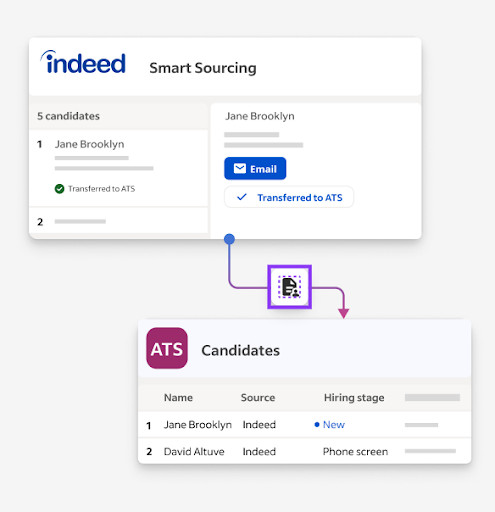
Retrieve ATS candidates mockup -
Confirm that:
- You do not get common GraphQL errors when retrieving candidates.
- You can retrieve candidates.
- You can download candidates' resumes.
- You can acknowledge candidates and receive new candidates.
4. Get approval for your integration
Demonstrate the full integration flow live or in a recorded video:
- Create a registration.
- Confirm the registration appears in the ATS UI with a disable button.
- Disable the registration to remove it.
- Create a second registration.
- Use
stageAssetsto create a mock asset for the second registration. - Confirm the mock asset appears in the ATS within 5 minutes, with the correct source (optional). At minimum, the email, name, and resume must be visible.
- Disable the registration from Indeed's UI. The candidate stays in the ATS, but registration indicators disappear.
Indeed emails you after it approves your integration.
See also
- Partner Console > Credentials
- Client credentials grant type (2-legged OAuth)
- Integrate with Indeed and call APIs
- Common GraphQL error codes
stageAssets